Track a selected region
Upload a before frame and an after frame, then draw a region on the first image. Track its corners and estimate where that region moved.
The pipeline
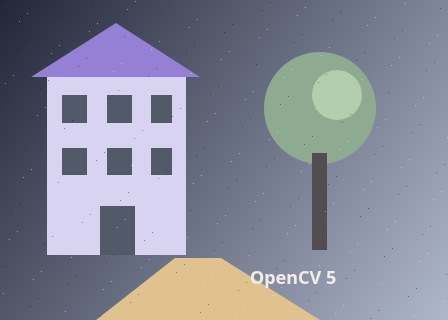
The unchanged source image. All steps use this same example.
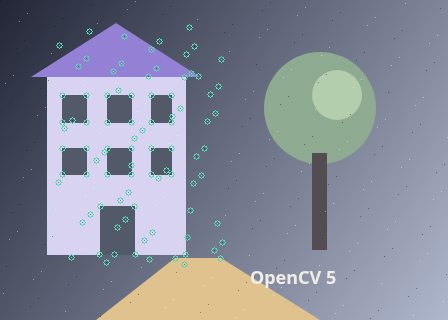
Corners detected only inside the selected region.
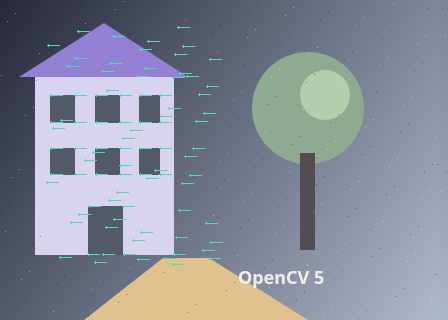
Forward/backward checking removes points that do not return close to their original position.
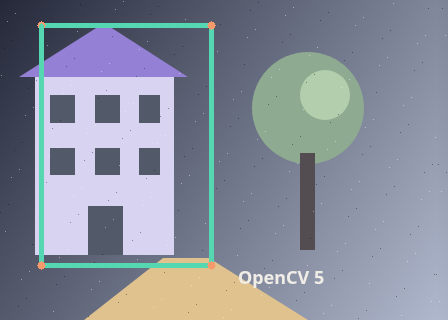
Tracked region: 88 inliers / 88 consistent tracks / 88 initial corners. Translation dx -12.000, dy -0.000 px. Scale 1.0000; rotation 0.00°.
Find corners in the region
Explore the algorithm →goodFeaturesToTrackRestrict Shi-Tomasi detection to the selected rectangle.
- Receives
- Grayscale first frame and a binary mask of your selected rectangle.
- Passes to the next step
- A sparse list of 2D corner coordinates inside the selected region.
Why this step? Shi-Tomasi corners have intensity variation in two directions, which makes their position less ambiguous than a point on a straight edge. The mask restricts evidence to the selected region so background features cannot dominate the fit.
Track forwards and backwards
Explore the algorithm →calcOpticalFlowPyrLKLucas-Kanade follows each point into the next frame; a backward check rejects inconsistent tracks.
- Receives
- Corner coordinates and both grayscale frames.
- Passes to the next step
- Pairs of original and tracked points that pass the forward/backward check.
Why this step? Pyramidal Lucas-Kanade searches for small patches with similar appearance, working from coarse images to finer ones. Tracking back into the first frame reveals points that jumped to an unrelated patch. The lab drops failed tracks and points whose return distance exceeds the tolerance.
Fit a robust transform
Explore the algorithm →estimateAffinePartial2DRANSAClineRANSAC fits translation, rotation and uniform scale; the transformed rectangle is drawn on the second frame.
- Receives
- The surviving point pairs and the rectangle corners.
- Produces
- A quadrilateral on the second image plus inlier count, translation, scale and rotation.
Why this step? A partial affine model describes translation, rotation and uniform scale with fewer parameters than a homography. RANSAC fits that shared motion while rejecting points on occluded or independently moving content. Applying the transform to the four rectangle corners produces the tracked outline.
Actual OpenCV 5.0.0 results on the illustrated sample, using the lab’s default algorithm settings. Masks, overlays and normalized fields are labelled previews; the data contracts above describe what the algorithms really exchange. Try this chain with your images ↓
Why this chain works
A rectangle has no visual identity of its own. Give it a set of distinctive points, follow those points into the next frame, then use their shared geometric motion to move the rectangle.
- 01
Find corners in the region
goodFeaturesToTrackShi-Tomasi corners have intensity variation in two directions, which makes their position less ambiguous than a point on a straight edge. The mask restricts evidence to the selected region so background features cannot dominate the fit.
- Receives
- Grayscale first frame and a binary mask of your selected rectangle.
- Passes on
- A sparse list of 2D corner coordinates inside the selected region.
- 02
Track forwards and backwards
calcOpticalFlowPyrLKPyramidal Lucas-Kanade searches for small patches with similar appearance, working from coarse images to finer ones. Tracking back into the first frame reveals points that jumped to an unrelated patch. The lab drops failed tracks and points whose return distance exceeds the tolerance.
- Receives
- Corner coordinates and both grayscale frames.
- Passes on
- Pairs of original and tracked points that pass the forward/backward check.
- 03
Fit a robust transform
estimateAffinePartial2DRANSAClineA partial affine model describes translation, rotation and uniform scale with fewer parameters than a homography. RANSAC fits that shared motion while rejecting points on occluded or independently moving content. Applying the transform to the four rectangle corners produces the tracked outline.
- Receives
- The surviving point pairs and the rectangle corners.
- Passes on
- A quadrilateral on the second image plus inlier count, translation, scale and rotation.
Tune and diagnose
Choose the parameters
Select a region with several distinct corners distributed across the object. Increase maximum corners when the region has rich texture; increasing it cannot help a blank surface. A smaller backward tolerance is stricter. For large jumps, use closer frames or feature-based alignment.
Read the result
Inspect Selected corners and Consistent tracks before trusting the final box. They should follow the same object and cover its area. A few clustered inliers or a box stretching onto the background indicate poor support. This estimates geometry, not an object segmentation mask.
Try it with your images
Choose an input image and a second image. Without uploads, the lab uses a labelled synthetic pair. Use “Draw a region” and drag a rectangle on the input, or enter its coordinates. Run the recipe, then use the stage buttons to inspect intermediate results without rerunning it.
Experiment at pixel level
Upload a before frame and an after frame, then draw a region on the first image. Track its corners and estimate where that region moved.
The engine loads on your first run. Your images stay in this browser.
Scroll over either image to zoom at the pointer. Use the scrollbars to pan both views over the same relative area. Zoom is relative to the input; pixel coordinates belong to each image. Warps can change scene correspondence.
Pixel inspector RGBA · native values · matched scale · 9 × 9 output pixels
Select a pixel
Select a pixel
Assumptions and limits
Needs texture, overlap and moderate motion. The fitted region is a geometric estimate, not a semantic object boundary. Tracking failure is reported when too few consistent points remain.
TypeScript core chain
Initialize the shared engine once with await initOpenCV(), then use these named imports. In a bundled browser app, pass the WASM URL as shown in the quickstart. image is an 8-bit BGR Mat from that same engine; paired recipes receive an equally sized nextImage. Region recipes use an in-bounds pixel rect. Read outputs before the using scope ends. See matrix ownership.
import {
  COLOR_BGR2GRAY,
  CV_32FC2,
  CV_8U,
  Mat,
  RANSAC,
  calcOpticalFlowPyrLK,
  countNonZero,
  cvtColor,
  estimateAffinePartial2D,
  goodFeaturesToTrack,
  line,
  rectangle
} from '@banou/opencv-wasm'

// The engine is already initialized; image is an 8-bit BGR Mat.
// nextImage is the equally sized second frame from the same engine.
// rect is an in-bounds { x, y, width, height } rectangle in processed pixels.
// "using" releases native handles at scope exit; inspect or copy outputs before then.

// 1. Prepare comparable single-channel images and a selection mask.
// Empty Mats are destinations; OpenCV allocates their storage as needed.
using beforeGray = new Mat(), afterGray = new Mat()
// Convert before-frame BGR pixels to brightness for corner detection.
cvtColor(image, beforeGray, COLOR_BGR2GRAY)
// Convert the after frame identically for patch matching.
cvtColor(nextImage, afterGray, COLOR_BGR2GRAY)
// Start with black everywhere: CV_8U is an 8-bit, single-channel mask.
using mask = Mat.zeros(image.rows, image.cols, CV_8U)
// Fill the selected rectangle white (255); thickness -1 means filled.
// Subtract one because the bottom-right pixel coordinate is inclusive.
rectangle(mask, { x: rect.x, y: rect.y },
  { x: rect.x + rect.width - 1, y: rect.y + rect.height - 1 }, [255, 0, 0, 0], -1)
// points/tracked hold float32 x,y pairs; status/error describe each track.
using points = new Mat(), tracked = new Mat()
using status = new Mat(), error = new Mat()
// Find at most 150 corners inside the mask. Require 1% of the strongest
// corner response and at least 5 pixels between retained corners.
goodFeaturesToTrack(beforeGray, points, 150, 0.01, 5, mask)
// A nearly flat selection cannot provide enough independent tracking evidence.
if (points.rows < 4) throw new Error('Select a textured region with at least four corners')
// 2. Track the selected patches into the next frame using a coarse-to-fine pyramid.
calcOpticalFlowPyrLK(beforeGray, afterGray, points, tracked, status, error)
// Allocate a second set of results for tracking the proposed matches backward.
using returned = new Mat(), backwardStatus = new Mat(), backwardError = new Mat()
// Ask where those after-frame locations land back in the first frame.
calcOpticalFlowPyrLK(afterGray, beforeGray, tracked, returned, backwardStatus, backwardError)
// Collect only point pairs that both trackers accept and that return nearby.
const from: number[] = [], to: number[] = []
// Each row is one point; its two adjacent float values are x and y.
for (let i = 0; i < points.rows; i++) {
  const x = points.data32F[i * 2], y = points.data32F[i * 2 + 1]
  // Distance in pixels between the original point and its round-trip return.
  const backwardDistance = Math.hypot(x - returned.data32F[i * 2], y - returned.data32F[i * 2 + 1])
  // A nonzero status means that track succeeded. The 1.5-pixel return limit
  // rejects many points that jumped onto a different feature.
  if (status.data[i] && backwardStatus.data[i] && backwardDistance <= 1.5) {
    // Append matching x,y pairs in the same order for the transform estimator.
    from.push(x, y)
    to.push(tracked.data32F[i * 2], tracked.data32F[i * 2 + 1])
  }
}
// Two numbers represent each point; eight numbers means four surviving pairs.
if (from.length < 8) throw new Error('Too few consistent tracks')
// 3. Pack each point list into an N-by-1, two-channel float32 matrix.
// The inliers destination will mark pairs accepted by the geometric fit.
using sourcePoints = new Mat(from.length / 2, 1, CV_32FC2)
using targetPoints = new Mat(to.length / 2, 1, CV_32FC2), inliers = new Mat()
// Copy JavaScript point coordinates into native matrix storage.
sourcePoints.data32F.set(from)
targetPoints.data32F.set(to)
// Fit translation, rotation and uniform scale together. RANSAC rejects
// outliers using a 3-pixel reprojection threshold; it does not fit perspective.
using transform = estimateAffinePartial2D(sourcePoints, targetPoints, inliers, RANSAC, 3)
// Stop if no transform or fewer than three geometrically consistent pairs remain.
if (transform.empty() || countNonZero(inliers) < 3) throw new Error('No stable region transform')
// Copy the six affine coefficients before another native allocation can grow memory.
const m = Array.from(transform.data64F)
// Apply x' = m0*x + m1*y + m2 and y' = m3*x + m4*y + m5
// to the four selection corners; this moves the region as one rigid/scaled shape.
const corners = [[rect.x, rect.y], [rect.x + rect.width, rect.y],
  [rect.x + rect.width, rect.y + rect.height], [rect.x, rect.y + rect.height]]
  .map(([x, y]) => ({ x: Math.round(m[0] * x + m[1] * y + m[2]), y: Math.round(m[3] * x + m[4] * y + m[5]) }))
// Make an independent copy of the second image so drawing cannot modify its pixels.
using output = nextImage.mat_clone()
// Connect successive transformed corners with a 3-pixel coloured outline.
for (let i = 0; i < 4; i++) line(output, corners[i], corners[(i + 1) % 4], [178, 216, 85, 255], 3)
The snippets isolate the core operations. The complete runnable recipes also include validation, filtering, overlays, intermediate previews and resource cleanup.