Straighten a tilted page
Estimate a dominant near-horizontal line angle and rotate the page to make those lines level.
The pipeline
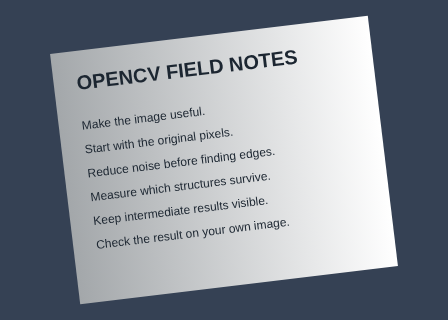
The unchanged source image. All steps use this same example.
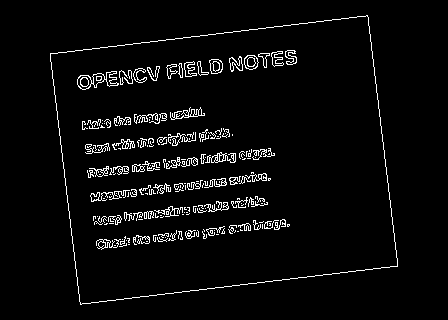
Edges used to estimate the dominant line orientation.
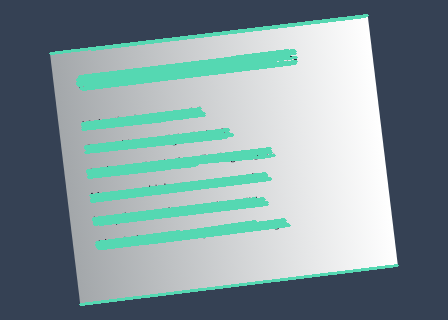
The median angle of these lines determines the correction.
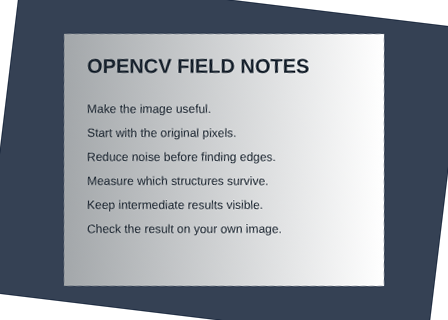
Corrected -6.895° using 65 line segments.
Find strong edges
Explore the algorithm →CannyCanny exposes text and page boundaries.
- Receives
- The grayscale page.
- Passes to the next step
- An edge map.
Why this step? Canny emphasizes text and rule edges. A sparse edge representation gives the following line detector evidence about direction without treating every filled character pixel as an independent feature.
Estimate the tilt
Explore the algorithm →HoughLinesPMedian angleProbabilistic Hough segments vote through their median angle.
- Receives
- The edge map.
- Passes to the next step
- A set of accepted segments and one median tilt estimate.
Why this step? Probabilistic Hough detection extracts line segments. The lab normalizes their directions and keeps only segments within the accepted near-horizontal angle range. Taking the median reduces the influence of a few slanted graphics or incorrect segments.
Rotate around the centre
Explore the algorithm →getRotationMatrix2DwarpAffineAn affine warp applies the estimated correction.
- Receives
- The colour page and median angle.
- Produces
- A page rotated into the same output dimensions, with the correction angle reported.
Why this step? A rotation about the image centre applies the estimated correction to all pixels consistently. With image coordinates increasing downward, the measured atan2 angle is passed to OpenCV’s rotation matrix to level those segments. Cubic interpolation resamples pixels and a white border fills exposed space.
Actual OpenCV 5.0.0 results on the illustrated sample, using the lab’s default algorithm settings. Masks, overlays and normalized fields are labelled previews; the data contracts above describe what the algorithms really exchange. Try this chain with your images ↓
Why this chain works
Many text baselines or ruled lines share a small tilt. Detect those directions, summarize the dominant angle robustly, then correct the entire page with one rotation.
- 01
Find strong edges
CannyCanny emphasizes text and rule edges. A sparse edge representation gives the following line detector evidence about direction without treating every filled character pixel as an independent feature.
- Receives
- The grayscale page.
- Passes on
- An edge map.
- 02
Estimate the tilt
HoughLinesPMedian angleProbabilistic Hough detection extracts line segments. The lab normalizes their directions and keeps only segments within the accepted near-horizontal angle range. Taking the median reduces the influence of a few slanted graphics or incorrect segments.
- Receives
- The edge map.
- Passes on
- A set of accepted segments and one median tilt estimate.
- 03
Rotate around the centre
getRotationMatrix2DwarpAffineA rotation about the image centre applies the estimated correction to all pixels consistently. With image coordinates increasing downward, the measured atan2 angle is passed to OpenCV’s rotation matrix to level those segments. Cubic interpolation resamples pixels and a white border fills exposed space.
- Receives
- The colour page and median angle.
- Passes on
- A page rotated into the same output dimensions, with the correction angle reported.
Tune and diagnose
Choose the parameters
Increase minimum line length to reject short character fragments, or decrease it when no useful segments survive. Limit accepted tilt to the expected document orientation so vertical rules do not dominate.
Read the result
Inspect Accepted lines: they should follow text or intended horizontal rules. Tables and decorative lines can bias the median. Rotation can clip corners in the unchanged canvas size, and it cannot remove perspective distortion.
Try it with your images
Choose your own image or start with the built-in sample. Run the recipe, then use the stage buttons to inspect intermediate results without rerunning it.
Experiment at pixel level
Estimate a dominant near-horizontal line angle and rotate the page to make those lines level.
The engine loads on your first run. Your images stay in this browser.
Scroll over either image to zoom at the pointer. Use the scrollbars to pan both views over the same relative area. Zoom is relative to the input; pixel coordinates belong to each image. Warps can change scene correspondence.
Pixel inspector RGBA · native values · matched scale · 9 × 9 output pixels
Select a pixel
Select a pixel
Assumptions and limits
Requires several near-horizontal lines. Tables, perspective distortion and vertical layouts can bias the estimate.
TypeScript core chain
Initialize the shared engine once with await initOpenCV(), then use these named imports. In a bundled browser app, pass the WASM URL as shown in the quickstart. image is an 8-bit BGR Mat from that same engine; paired recipes receive an equally sized nextImage. Region recipes use an in-bounds pixel rect. Read outputs before the using scope ends. See matrix ownership.
import {
  COLOR_BGR2GRAY,
  Canny,
  HoughLinesP,
  Mat,
  cvtColor,
  getRotationMatrix2D,
  warpAffine
} from '@banou/opencv-wasm'

// The engine is already initialized; image is an 8-bit BGR Mat.
// "using" releases native handles at scope exit; inspect or copy outputs before then.

// 1. Allocate grayscale, edge pixels and detected line-segment coordinates.
using gray = new Mat(), edges = new Mat(), lines = new Mat()
// Use brightness for line detection while keeping the colour input for final rotation.
cvtColor(image, gray, COLOR_BGR2GRAY)
// Build an edge map using low/high gradient thresholds 50 and 150.
Canny(gray, edges, 50, 150)
// 2. Detect line segments with 1-pixel distance bins and 1-degree angle bins.
// Require 25 votes, a length of at least 50 pixels, and gaps of at most 15 pixels.
HoughLinesP(edges, lines, 1, Math.PI / 180, 25, 50, 15)
// Collect near-horizontal line directions as candidates for the page tilt.
const angles: number[] = []
// Every segment occupies four integers: its start x,y followed by end x,y.
for (let i = 0; i < lines.data32S.length; i += 4) {
  // Read one segment's two endpoints from the native coordinate array.
  const [x1, y1, x2, y2] = lines.data32S.slice(i, i + 4)
  // atan2 gives its direction in radians; multiply by 180/pi for degrees.
  const angle = Math.atan2(y2 - y1, x2 - x1) * 180 / Math.PI
  // Keep slopes within 25 degrees of horizontal to exclude vertical page edges.
  // The full lab also normalizes reversed endpoint directions before this check.
  if (Math.abs(angle) <= 25) angles.push(angle)
}
// Do not rotate arbitrarily if no suitable line evidence was found.
if (!angles.length) throw new Error('No near-horizontal lines found')
// 3. Sorting lets the middle angle act as a robust tilt estimate despite some outliers.
angles.sort((a,b) => a-b)
// Build a rotation about the image centre using that middle angle. Scale 1 keeps size.
// In image coordinates (y downward), this OpenCV rotation levels the measured slope.
using rotation = getRotationMatrix2D({ x: image.cols / 2, y: image.rows / 2 }, angles[Math.floor(angles.length / 2)], 1)
// Allocate the rotated colour result.
using output = new Mat()
// Resample into the original canvas dimensions. This short form uses default
// interpolation and border fill; the full lab uses cubic interpolation and white borders.
warpAffine(image, output, rotation, { width: image.cols, height: image.rows })
The snippets isolate the core operations. The complete runnable recipes also include validation, filtering, overlays, intermediate previews and resource cleanup.