Find and flatten a document
Find the largest convex quadrilateral in the edge map, correct its perspective, then produce a locally thresholded document view.
The pipeline
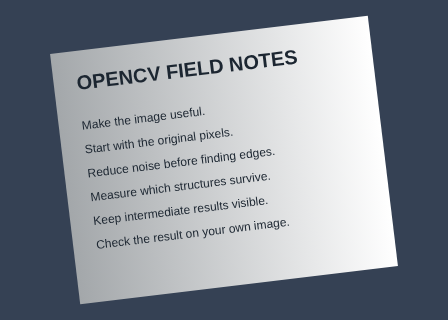
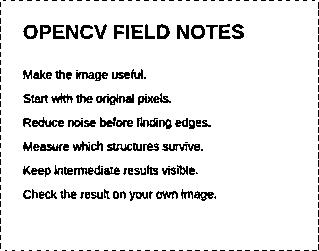
The unchanged source image. All steps use this same example.
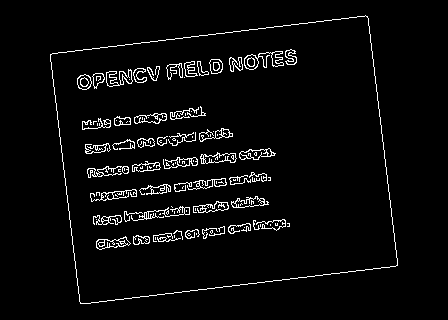
Candidate page boundaries after smoothing and edge detection.
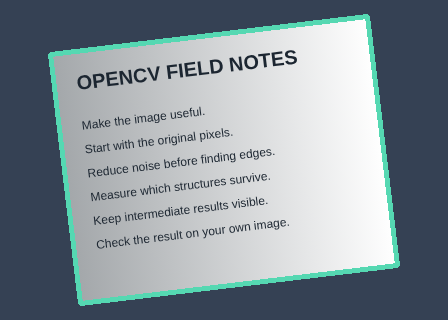
The largest convex quadrilateral is ordered around its centre.
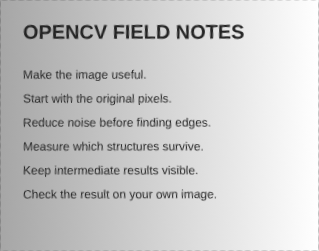
Perspective-corrected grayscale page before binarization.
Page area 80073 px²; rectified size 319 × 251.
Detect document outlines
Explore the algorithm →GaussianBlurCannyBlur and Canny produce candidate boundaries.
- Receives
- A grayscale photo containing the whole page.
- Passes to the next step
- An 8-bit edge map.
Why this step? A small blur suppresses fine noise before Canny detects strong connected edges. The edge map emphasizes candidate page boundaries, reducing the geometry search from all pixels to visible outlines.
Choose four corners
Explore the algorithm →findContoursapproxPolyDPisContourConvexApproximate contours and retain the largest convex quadrilateral.
- Receives
- The edge map.
- Passes to the next step
- Four ordered page corners, or an explicit failure if no suitable candidate exists.
Why this step? Contours group edge pixels into outlines. Polygon approximation reduces each outline to dominant corners, and the lab selects the largest convex four-corner candidate covering at least 5% of the image. Ordering its corners consistently is essential before constructing correspondences.
Flatten and binarize
Explore the algorithm →getPerspectiveTransformwarpPerspectiveadaptiveThresholdPerspective warping and adaptive thresholding create a readable scan.
- Receives
- Four page corners and four destination rectangle corners.
- Produces
- A perspective-corrected black-and-white document image.
Why this step? The perspective transform maps the planar page into a flat rectangle; output dimensions are estimated from opposing edge lengths. Adaptive thresholding then separates ink using local neighbourhood brightness, helping when illumination still varies across the corrected page.
Actual OpenCV 5.0.0 results on the illustrated sample, using the lab’s default algorithm settings. Masks, overlays and normalized fields are labelled previews; the data contracts above describe what the algorithms really exchange. Try this chain with your images ↓
Why this chain works
A photographed page is usually a quadrilateral. Find that geometry first, map it to a rectangle, then decide which pixels represent ink in the corrected view.
- 01
Detect document outlines
GaussianBlurCannyA small blur suppresses fine noise before Canny detects strong connected edges. The edge map emphasizes candidate page boundaries, reducing the geometry search from all pixels to visible outlines.
- Receives
- A grayscale photo containing the whole page.
- Passes on
- An 8-bit edge map.
- 02
Choose four corners
findContoursapproxPolyDPisContourConvexContours group edge pixels into outlines. Polygon approximation reduces each outline to dominant corners, and the lab selects the largest convex four-corner candidate covering at least 5% of the image. Ordering its corners consistently is essential before constructing correspondences.
- Receives
- The edge map.
- Passes on
- Four ordered page corners, or an explicit failure if no suitable candidate exists.
- 03
Flatten and binarize
getPerspectiveTransformwarpPerspectiveadaptiveThresholdThe perspective transform maps the planar page into a flat rectangle; output dimensions are estimated from opposing edge lengths. Adaptive thresholding then separates ink using local neighbourhood brightness, helping when illumination still varies across the corrected page.
- Receives
- Four page corners and four destination rectangle corners.
- Passes on
- A perspective-corrected black-and-white document image.
Tune and diagnose
Choose the parameters
Include all page corners and contrast between the page and surrounding surface. Adjust the Canny low threshold if the page border disappears or excessive clutter dominates. Threshold C adjusts ink selection after the geometry has been established.
Read the result
Inspect Selected page and Flattened page separately. If the chosen quadrilateral is wrong, no threshold adjustment can repair the geometry. A curved page or missing border needs another model or manually supplied corners.
Try it with your images
Choose your own image or start with the built-in sample. Run the recipe, then use the stage buttons to inspect intermediate results without rerunning it.
Experiment at pixel level
Find the largest convex quadrilateral in the edge map, correct its perspective, then produce a locally thresholded document view.
The engine loads on your first run. Your images stay in this browser.
Scroll over either image to zoom at the pointer. Use the scrollbars to pan both views over the same relative area. Zoom is relative to the input; pixel coordinates belong to each image. Warps can change scene correspondence.
Pixel inspector RGBA · native values · matched scale · 9 × 9 output pixels
Select a pixel
Select a pixel
Assumptions and limits
The page must have a visible four-sided border. The recipe reports failure if none is found; it does not invent corners.
TypeScript core chain
Initialize the shared engine once with await initOpenCV(), then use these named imports. In a bundled browser app, pass the WASM URL as shown in the quickstart. image is an 8-bit BGR Mat from that same engine; paired recipes receive an equally sized nextImage. Region recipes use an in-bounds pixel rect. Read outputs before the using scope ends. See matrix ownership.
import {
  CHAIN_APPROX_SIMPLE,
  COLOR_BGR2GRAY,
  Canny,
  GaussianBlur,
  Mat,
  MatVector,
  RETR_LIST,
  approxPolyDP,
  arcLength,
  contourArea,
  cvtColor,
  findContours,
  isContourConvex
} from '@banou/opencv-wasm'

// The engine is already initialized; image is an 8-bit BGR Mat.
// "using" releases native handles at scope exit; inspect or copy outputs before then.

// 1. Allocate grayscale, an edge map and contour hierarchy metadata.
using gray = new Mat(), edges = new Mat(), hierarchy = new Mat()
// Store candidate outlines as a vector of coordinate Mats.
using contours = new MatVector()
// Convert the page photo to brightness before boundary detection.
cvtColor(image, gray, COLOR_BGR2GRAY)
// A 5x5 Gaussian with sigma 1 suppresses small noisy edges.
GaussianBlur(gray, gray, { width: 5, height: 5 }, 1)
// Keep strong gradients above 120 and connected weaker edges above 40.
Canny(gray, edges, 40, 120)
// 2. RETR_LIST retrieves outlines without organizing parent/child hierarchy.
// CHAIN_APPROX_SIMPLE compresses straight runs so shape approximation has fewer points.
findContours(edges, contours, hierarchy, RETR_LIST, CHAIN_APPROX_SIMPLE)
// Inspect each candidate outline for a plausible four-sided page.
for (let i = 0; i < contours.size(); i++) {
  // Own the retrieved contour handle and allocate its simplified polygon.
  using contour = contours.get(i)!, polygon = new Mat()
  // Simplify the closed outline with a tolerance of 2% of its perimeter.
  // This removes small wiggles while retaining its dominant corners.
  approxPolyDP(contour, polygon, 0.02 * arcLength(contour, true), true)
  // Four vertices and convexity make a candidate quadrilateral; area ranks candidates.
  // This short example lists candidates rather than guessing a page when none exists.
  if (polygon.rows === 4 && isContourConvex(polygon)) console.log('Candidate area:', contourArea(polygon))
}
// Order the largest quadrilateral, fit getPerspectiveTransform, then warpPerspective.
The snippets isolate the core operations. The complete runnable recipes also include validation, filtering, overlays, intermediate previews and resource cleanup.