Find a patch in another image
Draw a patch on the first image and locate its best matching position in the second image.
The pipeline

The unchanged source image. All steps use this same example.
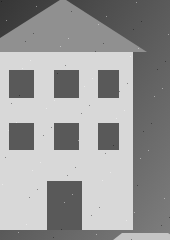
The first-image selection is the template searched for in the second frame.
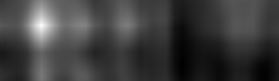
Each score belongs to a possible top-left placement of the template. Higher is more similar.
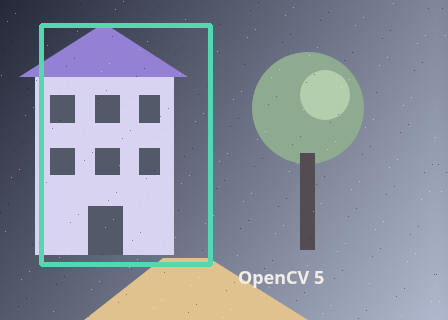
Best score 1.00000 at (41, 25). Match accepted.
Crop the selected patch
Explore the algorithm →Mat.roimeanStdDevExtract the first-image rectangle as the template.
- Receives
- Your rectangle in the first grayscale frame.
- Passes to the next step
- A textured grayscale template with a fixed width and height.
Why this step? Cropping preserves the exact texture to search for. The standard-deviation check rejects almost uniform patches: normalized correlation needs variation, and a flat patch has little distinctive information.
Search the next image
Explore the algorithm →matchTemplateTM_CCOEFF_NORMEDNormalized correlation scores every possible placement.
- Receives
- The template and second grayscale frame.
- Passes to the next step
- A floating score map indexed by candidate template top-left positions.
Why this step? Normalized, mean-centred correlation compares spatial patterns with less sensitivity to a uniform brightness offset or scale. It evaluates every valid top-left placement. The score map is smaller than the image because the whole template must fit inside each candidate window.
Mark the strongest response
Explore the algorithm →minMaxLocrectangleUse the peak location to draw the template-sized rectangle on the second image.
- Receives
- The correlation map and original template dimensions.
- Produces
- An accepted rectangle in the second frame, or a below-threshold result without a box.
Why this step? The maximum identifies the best candidate, but even unrelated images have a maximum. The acceptance threshold decides whether to draw a rectangle; preserving the score lets you assess how convincing that candidate is.
Actual OpenCV 5.0.0 results on the illustrated sample, using the lab’s default algorithm settings. Masks, overlays and normalized fields are labelled previews; the data contracts above describe what the algorithms really exchange. Try this chain with your images ↓
Why this chain works
If a patch keeps its appearance and size, finding it is a search over translations. Compare the patch with every same-sized window in the next image, then interpret the resulting score map.
- 01
Crop the selected patch
Mat.roimeanStdDevCropping preserves the exact texture to search for. The standard-deviation check rejects almost uniform patches: normalized correlation needs variation, and a flat patch has little distinctive information.
- Receives
- Your rectangle in the first grayscale frame.
- Passes on
- A textured grayscale template with a fixed width and height.
- 02
Search the next image
matchTemplateTM_CCOEFF_NORMEDNormalized, mean-centred correlation compares spatial patterns with less sensitivity to a uniform brightness offset or scale. It evaluates every valid top-left placement. The score map is smaller than the image because the whole template must fit inside each candidate window.
- Receives
- The template and second grayscale frame.
- Passes on
- A floating score map indexed by candidate template top-left positions.
- 03
Mark the strongest response
minMaxLocrectangleThe maximum identifies the best candidate, but even unrelated images have a maximum. The acceptance threshold decides whether to draw a rectangle; preserving the score lets you assess how convincing that candidate is.
- Receives
- The correlation map and original template dimensions.
- Passes on
- An accepted rectangle in the second frame, or a below-threshold result without a box.
Tune and diagnose
Choose the parameters
Choose a distinctive patch that includes texture but little independently moving background. Raise the minimum score when false matches are common. If the object rotates or changes scale, use feature matching or region tracking instead of expecting the threshold to compensate.
Read the result
Inspect the correlation map. One isolated peak is more useful than several similar peaks from repeated windows, tiles or text. Map coordinates refer to the patch top-left, not its centre.
Try it with your images
Choose an input image and a second image. Without uploads, the lab uses a labelled synthetic pair. Use “Draw a region” and drag a rectangle on the input, or enter its coordinates. Run the recipe, then use the stage buttons to inspect intermediate results without rerunning it.
Experiment at pixel level
Draw a patch on the first image and locate its best matching position in the second image.
The engine loads on your first run. Your images stay in this browser.
Scroll over either image to zoom at the pointer. Use the scrollbars to pan both views over the same relative area. Zoom is relative to the input; pixel coordinates belong to each image. Warps can change scene correspondence.
Pixel inspector RGBA · native values · matched scale · 9 × 9 output pixels
Select a pixel
Select a pixel
Assumptions and limits
Works best without rotation, scale changes or substantial appearance changes. A low score still has a maximum and is not proof of a match.
TypeScript core chain
Initialize the shared engine once with await initOpenCV(), then use these named imports. In a bundled browser app, pass the WASM URL as shown in the quickstart. image is an 8-bit BGR Mat from that same engine; paired recipes receive an equally sized nextImage. Region recipes use an in-bounds pixel rect. Read outputs before the using scope ends. See matrix ownership.
import {
  COLOR_BGR2GRAY,
  Mat,
  TM_CCOEFF_NORMED,
  cvtColor,
  matchTemplate,
  meanStdDev,
  minMaxLoc
} from '@banou/opencv-wasm'

// The engine is already initialized; image is an 8-bit BGR Mat.
// nextImage is the equally sized second frame from the same engine.
// rect is an in-bounds { x, y, width, height } rectangle in processed pixels.
// "using" releases native handles at scope exit; inspect or copy outputs before then.

// 1. Allocate grayscale views of the two frames; matching uses brightness patterns.
using beforeGray = new Mat(), afterGray = new Mat()
// Convert the image containing your selected template to grayscale.
cvtColor(image, beforeGray, COLOR_BGR2GRAY)
// Convert the image we will search to the same representation.
cvtColor(nextImage, afterGray, COLOR_BGR2GRAY)
// roi selects the exact patch without resizing it; it shares the source storage.
// The scores destination will hold one float per possible top-left placement.
using template = beforeGray.roi(rect), scores = new Mat()
// Allocate outputs for the patch mean and standard deviation.
using mean = new Mat(), deviation = new Mat()
// Measure variation: a nearly uniform patch has no distinctive pattern to locate.
meanStdDev(template, mean, deviation)
// Reject a patch varying by less than one grayscale level (8-bit range 0..255).
if (deviation.data64F[0] < 1) throw new Error('Select a textured patch')
// 2. Slide the patch across the second image and compare mean-centred patterns.
// TM_CCOEFF_NORMED gives normalized correlation, with higher scores more similar.
matchTemplate(afterGray, template, scores, TM_CCOEFF_NORMED)
// 3. Find the strongest score and its template top-left position, not its centre.
const { maxLoc, maxVal } = minMaxLoc(scores)
// Accept only a score of at least 0.6. This cutoff is a choice, not a probability;
// even unrelated images have a maximum, and repeated patterns can have many peaks.
if (maxVal >= 0.6) {
  // The patch width/height plus this position define its candidate rectangle.
  console.log('Template top-left:', maxLoc, 'score:', maxVal)
}
The snippets isolate the core operations. The complete runnable recipes also include validation, filtering, overlays, intermediate previews and resource cleanup.