Highlight structural image differences
Compute a local SSIM map, threshold low similarity and highlight contiguous differences on the second image.
The pipeline
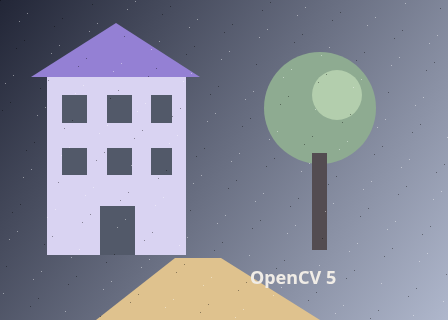
The unchanged source image. All steps use this same example.
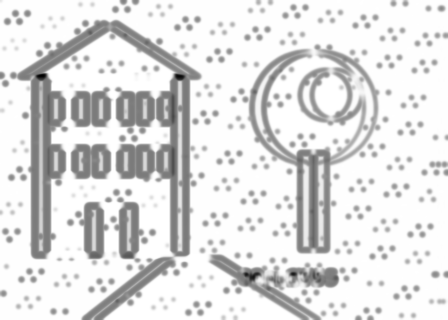
Native values measure local structural similarity; the preview is normalized.
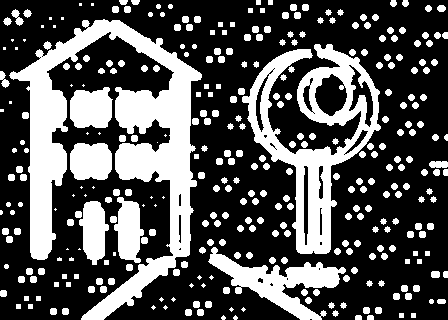
White marks pixels that pass the difference cutoff, before gaps are closed or small regions are discarded.
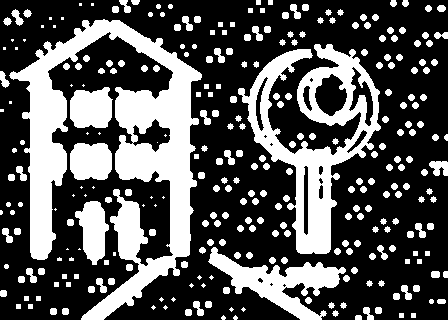
Morphological closing joins nearby differences before component filtering.
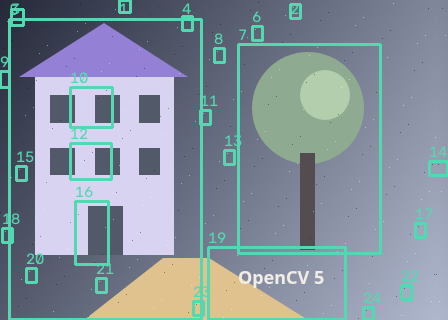
Mean SSIM 0.76105. 24 regions retained from 295 foreground components.
Measure structural similarity
Explore the algorithm →quality_QualitySSIM_computeSSIM compares local means, contrast and structure.
- Receives
- Two aligned grayscale images.
- Passes to the next step
- A floating local SSIM map and a mean similarity score.
Why this step? SSIM compares local means, contrast and correlation. Its map tells you where neighbourhood structure agrees; the mean score alone would hide the location of differences. The lab retains the native values because display normalization changes their visual brightness.
Select low-similarity pixels
Explore the algorithm →thresholdTHRESH_BINARY_INVMat.convertToThreshold the numeric map, retaining its original values for inspection.
- Receives
- The native SSIM map.
- Passes to the next step
- An 8-bit mask of locally dissimilar pixels.
Why this step? High values indicate greater similarity. Inverse thresholding selects values below the minimum similarity, then conversion to 8-bit gives morphology and component labelling the binary format they require.
Draw difference regions
Explore the algorithm →morphologyExMORPH_CLOSEconnectedComponentsWithStatsClose small gaps and reject tiny components.
- Receives
- The low-similarity mask.
- Produces
- Outlined difference regions on the second image.
Why this step? Closing connects nearby fragments of one difference. Component statistics provide region bounds and area, so a minimum-area decision removes small isolated changes without discarding the numeric SSIM evidence.
Actual OpenCV 5.0.0 results on the illustrated sample, using the lab’s default algorithm settings. Masks, overlays and normalized fields are labelled previews; the data contracts above describe what the algorithms really exchange. Try this chain with your images ↓
Why this chain works
When local appearance changes matter more than raw per-pixel brightness error, compare neighbourhood structure first. Then localize low-similarity areas with the same mask-to-region machinery used for change detection.
- 01
Measure structural similarity
quality_QualitySSIM_computeSSIM compares local means, contrast and correlation. Its map tells you where neighbourhood structure agrees; the mean score alone would hide the location of differences. The lab retains the native values because display normalization changes their visual brightness.
- Receives
- Two aligned grayscale images.
- Passes on
- A floating local SSIM map and a mean similarity score.
- 02
Select low-similarity pixels
thresholdTHRESH_BINARY_INVMat.convertToHigh values indicate greater similarity. Inverse thresholding selects values below the minimum similarity, then conversion to 8-bit gives morphology and component labelling the binary format they require.
- Receives
- The native SSIM map.
- Passes on
- An 8-bit mask of locally dissimilar pixels.
- 03
Draw difference regions
morphologyExMORPH_CLOSEconnectedComponentsWithStatsClosing connects nearby fragments of one difference. Component statistics provide region bounds and area, so a minimum-area decision removes small isolated changes without discarding the numeric SSIM evidence.
- Receives
- The low-similarity mask.
- Passes on
- Outlined difference regions on the second image.
Tune and diagnose
Choose the parameters
Raising minimum SSIM marks more subtle differences. Lower it to focus on large structural disagreements. Tune cleanup and area only after the raw map identifies the differences you care about.
Read the result
Misregistration often produces differences along almost every edge. Align first. This grayscale chain can miss colour-only changes and does not know which differences are meaningful to a person.
Try it with your images
Choose an input image and a second image. Without uploads, the lab uses a labelled synthetic pair. Run the recipe, then use the stage buttons to inspect intermediate results without rerunning it.
Experiment at pixel level
Compute a local SSIM map, threshold low similarity and highlight contiguous differences on the second image.
The engine loads on your first run. Your images stay in this browser.
Scroll over either image to zoom at the pointer. Use the scrollbars to pan both views over the same relative area. Zoom is relative to the input; pixel coordinates belong to each image. Warps can change scene correspondence.
Pixel inspector RGBA · native values · matched scale · 9 × 9 output pixels
Select a pixel
Select a pixel
Assumptions and limits
Images must already be aligned. SSIM is not a semantic assessment and colour-only changes may be missed in this grayscale recipe.
TypeScript core chain
Initialize the shared engine once with await initOpenCV(), then use these named imports. In a bundled browser app, pass the WASM URL as shown in the quickstart. image is an 8-bit BGR Mat from that same engine; paired recipes receive an equally sized nextImage. Region recipes use an in-bounds pixel rect. Read outputs before the using scope ends. See matrix ownership.
import {
  COLOR_BGR2GRAY,
  CV_8U,
  MORPH_CLOSE,
  MORPH_ELLIPSE,
  Mat,
  THRESH_BINARY_INV,
  cvtColor,
  getStructuringElement,
  morphologyEx,
  quality_QualitySSIM_compute,
  threshold
} from '@banou/opencv-wasm'

// The engine is already initialized; image is an 8-bit BGR Mat.
// nextImage is the equally sized second frame from the same engine.
// "using" releases native handles at scope exit; inspect or copy outputs before then.

// 1. Allocate grayscale images, a floating similarity map, and a decision mask.
using a = new Mat(), b = new Mat(), similarity = new Mat(), mask = new Mat()
// Use grayscale for the first image; this recipe does not compare colour alone.
cvtColor(image, a, COLOR_BGR2GRAY)
// Convert the second, already-aligned image to the same grayscale representation.
cvtColor(nextImage, b, COLOR_BGR2GRAY)
// SSIM compares local brightness, contrast and structure. similarity receives
// the local scores; score[0] is their overall grayscale-channel summary.
const score = quality_QualitySSIM_compute(a, b, similarity)
// 2. Mark similarity values at or below 0.8 white. The inverse threshold selects
// disagreement: a larger minimum similarity is stricter and marks more differences.
threshold(similarity, mask, 0.8, 255, THRESH_BINARY_INV)
// Thresholding kept the float depth; convert to an 8-bit mask for later region labelling.
mask.convertTo(mask, CV_8U)
// Choose a 3x3 ellipse so cleanup only bridges small spatial gaps.
using kernel = getStructuringElement(MORPH_ELLIPSE, { width: 3, height: 3 })
// 3. Closing reconnects fragmented differences before region labelling in the lab.
morphologyEx(mask, mask, MORPH_CLOSE, kernel)
// Keep the mean score as a summary, but inspect the map to see where changes occurred.
console.log('Mean grayscale SSIM:', score[0])
The snippets isolate the core operations. The complete runnable recipes also include validation, filtering, overlays, intermediate previews and resource cleanup.