Count separated objects
Separate bright objects from a dark background, clean the mask and count connected regions that pass an area filter.
The pipeline
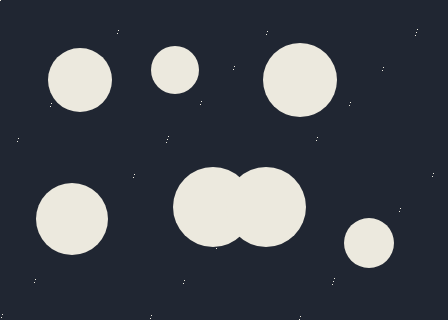
The unchanged source image. All steps use this same example.
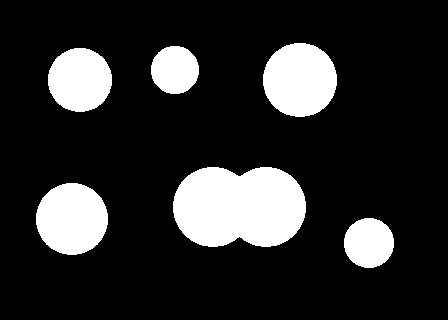
Bright foreground after smoothing and thresholding.
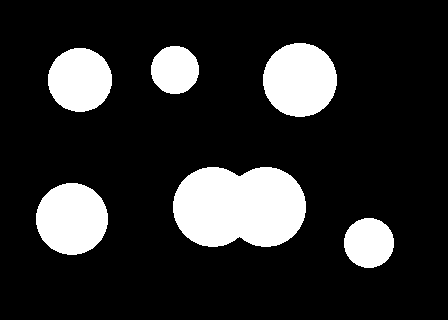
Opening removes specks smaller than the structuring element.
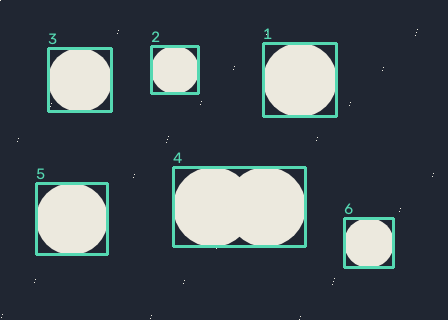
6 regions retained from 6 foreground components.
Create a foreground mask
Explore the algorithm →GaussianBlurthresholdSmooth grayscale intensity and apply a threshold.
- Receives
- An image with brighter objects on a darker background.
- Passes to the next step
- A binary foreground mask.
Why this step? Blur reduces small fluctuations, and the threshold decides which intensities belong to foreground. That decision determines what an object means for every following step; the component counter has no knowledge of the original appearance.
Remove small noise
Explore the algorithm →morphologyExMORPH_OPENMorphological opening removes isolated specks.
- Receives
- The foreground mask.
- Passes to the next step
- A cleaner set of foreground islands.
Why this step? Opening erodes and then dilates the mask, removing bright specks too small to hold the structuring element. It can also break narrow connections, but it can erase real thin objects, so its size must reflect the objects you want to count.
Count components
Explore the algorithm →connectedComponentsWithStatsConnected-component statistics provide areas, centroids and boxes.
- Receives
- The cleaned binary mask.
- Produces
- Object count, numbered boxes and inspectable component IDs.
Why this step? Labelling gives each connected island an integer ID. Statistics provide pixel area, bounding box and centroid; label zero is background. Only foreground labels meeting the minimum-area threshold contribute to the reported count.
Actual OpenCV 5.0.0 results on the illustrated sample, using the lab’s default algorithm settings. Masks, overlays and normalized fields are labelled previews; the data contracts above describe what the algorithms really exchange. Try this chain with your images ↓
Why this chain works
Counting starts with a definition of foreground. Here that definition is brightness. Once each object is a separate white island, connected-component labelling turns the counting problem into counting islands.
- 01
Create a foreground mask
GaussianBlurthresholdBlur reduces small fluctuations, and the threshold decides which intensities belong to foreground. That decision determines what an object means for every following step; the component counter has no knowledge of the original appearance.
- Receives
- An image with brighter objects on a darker background.
- Passes on
- A binary foreground mask.
- 02
Remove small noise
morphologyExMORPH_OPENOpening erodes and then dilates the mask, removing bright specks too small to hold the structuring element. It can also break narrow connections, but it can erase real thin objects, so its size must reflect the objects you want to count.
- Receives
- The foreground mask.
- Passes on
- A cleaner set of foreground islands.
- 03
Count components
connectedComponentsWithStatsLabelling gives each connected island an integer ID. Statistics provide pixel area, bounding box and centroid; label zero is background. Only foreground labels meeting the minimum-area threshold contribute to the reported count.
- Receives
- The cleaned binary mask.
- Passes on
- Object count, numbered boxes and inspectable component IDs.
Tune and diagnose
Choose the parameters
First choose a threshold that separates objects from their surroundings, then use the smallest opening kernel that removes noise. Finally set the area cutoff below the smallest legitimate object. For dark objects, invert the threshold in your own chain.
Read the result
Compare the mask with the image: one island should correspond to one intended object. Touching objects count as one; use the watershed recipe when they need splitting. Uneven lighting may call for adaptive thresholding or colour selection.
Try it with your images
Choose your own image or start with the built-in sample. Run the recipe, then use the stage buttons to inspect intermediate results without rerunning it.
Experiment at pixel level
Separate bright objects from a dark background, clean the mask and count connected regions that pass an area filter.
The engine loads on your first run. Your images stay in this browser.
Scroll over either image to zoom at the pointer. Use the scrollbars to pan both views over the same relative area. Zoom is relative to the input; pixel coordinates belong to each image. Warps can change scene correspondence.
Pixel inspector RGBA · native values · matched scale · 9 × 9 output pixels
Select a pixel
Select a pixel
Assumptions and limits
Touching objects become one component. Uneven lighting may need local thresholding or colour segmentation.
TypeScript core chain
Initialize the shared engine once with await initOpenCV(), then use these named imports. In a bundled browser app, pass the WASM URL as shown in the quickstart. image is an 8-bit BGR Mat from that same engine; paired recipes receive an equally sized nextImage. Region recipes use an in-bounds pixel rect. Read outputs before the using scope ends. See matrix ownership.
import {
  CC_STAT_AREA,
  COLOR_BGR2GRAY,
  GaussianBlur,
  MORPH_ELLIPSE,
  MORPH_OPEN,
  Mat,
  THRESH_BINARY,
  connectedComponentsWithStats,
  cvtColor,
  getStructuringElement,
  morphologyEx,
  threshold
} from '@banou/opencv-wasm'

// The engine is already initialized; image is an 8-bit BGR Mat.
// "using" releases native handles at scope exit; inspect or copy outputs before then.

// 1. Allocate a grayscale view and a binary foreground mask.
using gray = new Mat(), mask = new Mat()
// Reduce colour to brightness because foreground is defined by intensity here.
cvtColor(image, gray, COLOR_BGR2GRAY)
// A 5x5 blur with sigma 1 suppresses small fluctuations before thresholding.
GaussianBlur(gray, gray, { width: 5, height: 5 }, 1)
// Pixels brighter than 127 become white (255); darker pixels become background (0).
threshold(gray, mask, 127, 255, THRESH_BINARY)
// Choose a 3x3 elliptical neighbourhood, smaller than objects you want to retain.
using kernel = getStructuringElement(MORPH_ELLIPSE, { width: 3, height: 3 })
// 2. Opening erodes then dilates: tiny white specks disappear while larger islands remain.
morphologyEx(mask, mask, MORPH_OPEN, kernel)
// Allocate per-pixel labels, per-label statistics, and x,y centroids.
using labels = new Mat(), stats = new Mat(), centroids = new Mat()
// 3. Label connected foreground islands. The returned count includes background label 0.
const count = connectedComponentsWithStats(mask, labels, stats, centroids)
// Accumulate only components large enough to count as intended objects.
let retained = 0
// Start at 1 to skip background. Each stats row has five signed 32-bit integers.
for (let label = 1; label < count; label++) {
  // CC_STAT_AREA selects the pixel-count column; require at least 80 pixels.
  // Touching objects share a label, so this counts connected islands, not semantic objects.
  if (stats.data32S[label * 5 + CC_STAT_AREA] >= 80) retained++
}
// Report the retained island count, which depends on threshold and cleanup choices.
console.log('Objects:', retained)
The snippets isolate the core operations. The complete runnable recipes also include validation, filtering, overlays, intermediate previews and resource cleanup.