Estimate depth from rectified stereo
Compute disparity, reject invalid matches and convert positive disparities into depth using the supplied focal length and camera baseline.
The pipeline
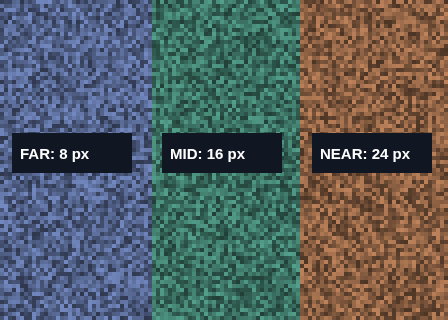
Synthetic rectified left view with three textured planes. Their disparities are 8, 16 and 24 px; larger disparity means nearer depth.
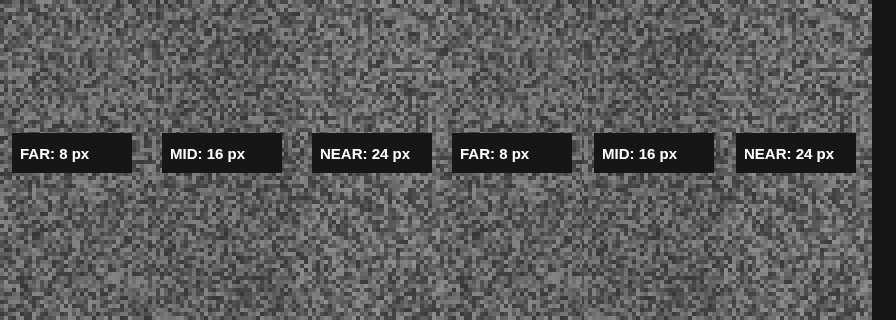
Left and right grayscale views must already have corresponding points on the same rows. This recipe assumes rectification; it does not calibrate cameras.
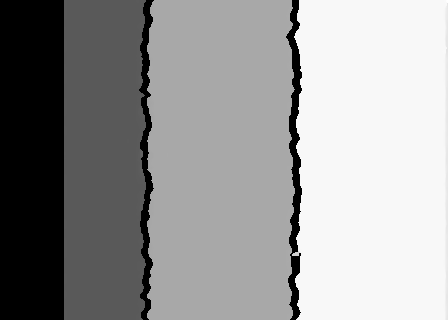
Positive disparity is horizontal displacement in pixels. Negative values are invalid.
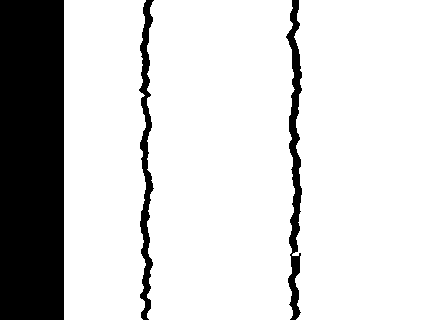
White marks positive disparities eligible for depth conversion. Black is invalid or nonpositive, not a measured zero distance.
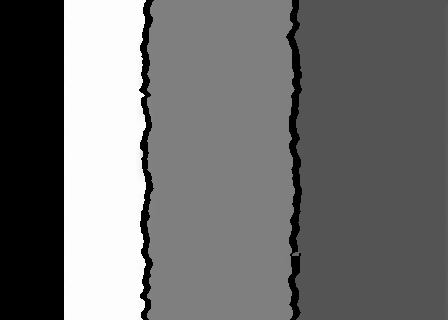
118381 positive-depth samples. Calibration assumptions determine the units and accuracy. Synthetic plane depth medians (far to near): 6.250, 3.125, 2.083 m with the example calibration. Bright means farther in this normalized depth preview; black is invalid.
Match rectified rows
Explore the algorithm →StereoSGBM.createStereoSGBM.computeStereo SGBM estimates horizontal disparity.
- Receives
- Left and right grayscale views with matching rectified rows.
- Passes to the next step
- A signed 16-bit disparity map encoded with four fractional bits.
Why this step? Semi-global block matching compares candidate horizontal offsets and regularizes neighbouring disparities. Rectification is a prerequisite: otherwise the corresponding point may lie on a different row that this search never considers.
Reject invalid disparities
Explore the algorithm →Mat.convertToPositive-disparity selectionNonpositive disparities are excluded from depth conversion.
- Receives
- The fixed-point disparity map.
- Passes to the next step
- Positive pixel disparities plus invalid samples.
Why this step? Multiplying by 1/16 recovers disparity in pixels. The lab excludes nonpositive values from depth conversion because they are invalid for this positive-baseline setup or would cause division by zero. This validity test alone does not establish a correct correspondence.
Convert disparity to depth
Explore the algorithm →Depth = focal length × baseline / disparityDepth = focal length × baseline / disparity.
- Receives
- Positive disparity, focal length in processed pixels and baseline in metres.
- Produces
- A float32 depth field in metres. The lab uses zero as an invalid-value marker.
Why this step? Similar-triangle geometry gives Z = fB/d for this calibrated, rectified arrangement. Converting units consistently is essential: resizing images changes the focal length in pixels. Small disparity errors at long distance can produce large depth errors because disparity is in the denominator.
Actual OpenCV 5.0.0 results on the illustrated sample, using the lab’s default algorithm settings. Masks, overlays and normalized fields are labelled previews; the data contracts above describe what the algorithms really exchange. Try this chain with your images ↓
Why this chain works
In a rectified stereo pair, a scene point appears at different horizontal positions in the two views. Nearby points shift more than distant points. Estimate that disparity first, then convert it to depth with calibrated camera geometry.
- 01
Match rectified rows
StereoSGBM.createStereoSGBM.computeSemi-global block matching compares candidate horizontal offsets and regularizes neighbouring disparities. Rectification is a prerequisite: otherwise the corresponding point may lie on a different row that this search never considers.
- Receives
- Left and right grayscale views with matching rectified rows.
- Passes on
- A signed 16-bit disparity map encoded with four fractional bits.
- 02
Reject invalid disparities
Mat.convertToPositive-disparity selectionMultiplying by 1/16 recovers disparity in pixels. The lab excludes nonpositive values from depth conversion because they are invalid for this positive-baseline setup or would cause division by zero. This validity test alone does not establish a correct correspondence.
- Receives
- The fixed-point disparity map.
- Passes on
- Positive pixel disparities plus invalid samples.
- 03
Convert disparity to depth
Depth = focal length × baseline / disparitySimilar-triangle geometry gives Z = fB/d for this calibrated, rectified arrangement. Converting units consistently is essential: resizing images changes the focal length in pixels. Small disparity errors at long distance can produce large depth errors because disparity is in the denominator.
- Receives
- Positive disparity, focal length in processed pixels and baseline in metres.
- Passes on
- A float32 depth field in metres. The lab uses zero as an invalid-value marker.
Tune and diagnose
Choose the parameters
Choose a disparity range large enough for the nearest expected objects and smaller than image width. Supply calibrated focal length adjusted for the processing scale and the real camera baseline. Arbitrary values yield arbitrary depth units or scale.
Read the result
The demo pair illustrates the calculation, not a calibrated camera measurement. Inspect disparity before depth, especially around occlusions, repeated texture and flat areas. Temporal camera panning without a known stereo setup is not sufficient for metric depth.
Try it with your images
Choose an input image and a second image. Without uploads, the lab uses a labelled synthetic pair. Run the recipe, then use the stage buttons to inspect intermediate results without rerunning it.
Experiment at pixel level
Compute disparity, reject invalid matches and convert positive disparities into depth using the supplied focal length and camera baseline.
The engine loads on your first run. Your images stay in this browser.
Scroll over either image to zoom at the pointer. Use the scrollbars to pan both views over the same relative area. Zoom is relative to the input; pixel coordinates belong to each image. Warps can change scene correspondence.
Pixel inspector RGBA · native values · matched scale · 9 × 9 output pixels
Select a pixel
Select a pixel
Assumptions and limits
Input views must be calibrated and rectified. Focal length is in processed-image pixels; baseline determines the depth unit. The default pair is synthetic.
TypeScript core chain
Initialize the shared engine once with await initOpenCV(), then use these named imports. In a bundled browser app, pass the WASM URL as shown in the quickstart. image is an 8-bit BGR Mat from that same engine; paired recipes receive an equally sized nextImage. Region recipes use an in-bounds pixel rect. Read outputs before the using scope ends. See matrix ownership.
import {
  COLOR_BGR2GRAY,
  Mat,
  StereoSGBM_create,
  cvtColor
} from '@banou/opencv-wasm'

// The engine is already initialized; image is an 8-bit BGR Mat.
// nextImage is the equally sized second frame from the same engine.
// "using" releases native handles at scope exit; inspect or copy outputs before then.

// 1. Allocate grayscale stereo views and a signed fixed-point disparity map.
// Inputs must already be calibrated/rectified so matches lie on the same image row.
using left = new Mat(), right = new Mat(), disparity = new Mat()
// Convert the left colour view to grayscale for block matching.
cvtColor(image, left, COLOR_BGR2GRAY)
// Convert the right view in the same way; matching uses horizontal offsets.
cvtColor(nextImage, right, COLOR_BGR2GRAY)
// 2. Search 64 disparities starting at 0 with a 9x9 matching block.
// The last two arguments are smoothness penalties P1 and P2; 81 is the
// block area (9*9) for one grayscale channel, with P2 larger to discourage jumps.
using stereo = StereoSGBM_create(0, 64, 9, 8 * 81, 32 * 81)
// Check the nullable matcher factory before computing disparity.
if (!stereo) throw new Error('Stereo factory failed')
// Estimate disparity x_left - x_right in pixels and store it multiplied by 16.
stereo.compute(left, right, disparity)
// 3. Example calibration: focal length 500 processed-image pixels, baseline 0.1 metres.
// Replace these with real calibration, adjusting focal length when images are resized.
const focalPixels = 500, baselineMetres = 0.1
// Create an independent JavaScript float array, one depth value per pixel.
const depthMetres = Float32Array.from(disparity.data16S, fixed => {
  // Divide the signed 16-bit fixed-point value by 16 to recover pixel disparity.
  const pixels = fixed / 16
  // Rectified stereo geometry gives Z = focalLength * baseline / disparity.
  // Reject nonpositive disparity and use zero as an invalid marker, not zero distance.
  return pixels > 0 ? focalPixels * baselineMetres / pixels : 0
})
// Inspect this numeric depth field; arbitrary calibration produces arbitrary depth scale.
console.log('Depth values; 0 means invalid:', depthMetres)
The snippets isolate the core operations. The complete runnable recipes also include validation, filtering, overlays, intermediate previews and resource cleanup.