Measure regional motion vectors
Measure delta vectors between a before frame and an after frame. See how far each region translated during a camera pan, inspect dense dx/dy values, or subtract the dominant image motion.
The pipeline
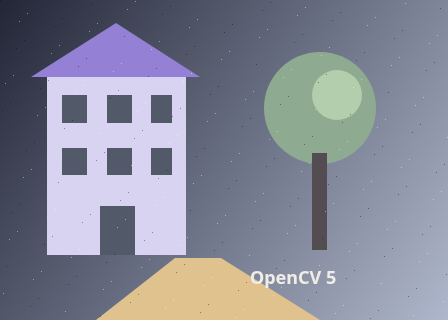
The unchanged source image. All steps use this same example.
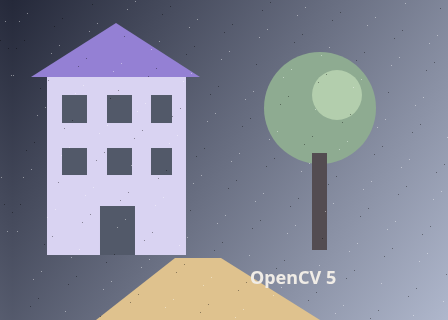
The phase-correlation estimate (-11.993, -0.006) px is removed before local flow estimation. Full displacement is restored in the reported vectors.

Full displacement before texture and round-trip rejection. Hue: right red, down yellow-green, left cyan, up violet. Brightness saturates at 24 px. These estimates include unsupported guesses in flat areas; the next step checks them.
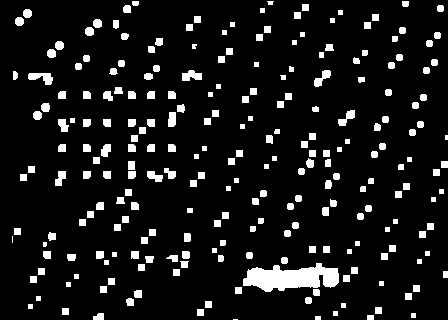
White pixels have enough local texture and pass the forward/backward check. This is a validity filter, not a calibrated confidence score.
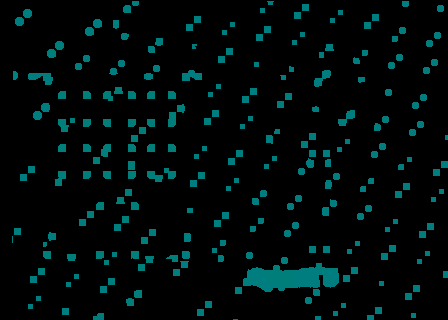
Dense map hue: right red, down yellow-green, left cyan, up violet. Brightness saturates at 24 px. Black can mean zero motion or rejected data; inspect the validity mask.
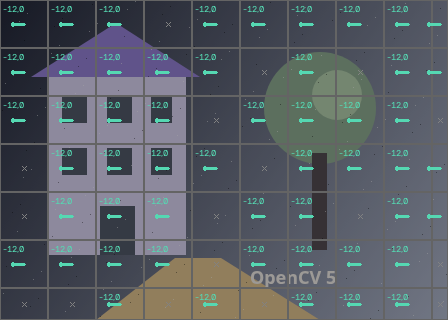
Dominant image translation: dx -11.998, dy -0.005 px. 53 / 70 grid regions measured; 9.2% of pixels pass checks. Vectors describe total input-to-second displacement. Arrows start on the first image. Labels are rounded dx,dy; inspect for precise values. Arrow display multiplier 1× does not change measured values. Dots mark near-zero motion; grey crosses mean insufficient evidence. Dense map hue: right red, down yellow-green, left cyan, up violet. Brightness saturates at 24 px. Black can mean zero motion or rejected data; inspect the validity mask.
Compensate for the initial pan
Explore the algorithm →phaseCorrelatecreateHanningWindowwarpAffinePhase correlation estimates a translation, then each frame is warped into the other’s coordinates before local flow estimation.
- Receives
- Two equally sized grayscale frames, converted to float32.
- Passes to the next step
- Two approximately aligned frames and an initial dx,dy estimate. Keep that estimate: the next step measures residual motion.
Why this step? Phase correlation looks for the global translation through frequency-domain phase differences. The Hann window reduces hard image-border discontinuities. Prewarping by this estimate brings the frames closer together, making local optical flow less likely to settle on an incorrect small-motion solution. A weak or implausibly large estimate is ignored.
Estimate dense displacement
Explore the algorithm →calcOpticalFlowFarnebackPyramidal Farneback flow estimates local residual motion in both directions. The preliminary pan is added back to obtain full displacement.
- Receives
- Each original frame and the other frame warped into its coordinates.
- Passes to the next step
- Forward and backward float32 dx,dy fields in the original processed-frame coordinates.
Why this step? Farneback fits local image structure at several resolutions to estimate a dense two-channel displacement field. Running it in both directions gives a way to check whether a proposed match can return to its starting point. Add the initial pan back to the forward field and subtract it from the reverse field before checking correspondence.
Check texture and summarize regions
Explore the algorithm →cornerMinEigenValPer-cell medianCorner response and backward consistency filter uncertain samples. Each grid cell reports the median of its accepted vectors.
- Receives
- The displacement fields, grayscale texture and regular grid cells.
- Produces
- Signed regional vectors, accepted-sample fractions and unknown cells. Positive dx points right; positive dy points down. The JSON and pixel inspector retain measurements independently of arrow scaling.
Why this step? A flat patch cannot determine a unique motion. Corner response rejects weak texture; sampling backward flow at the predicted destination rejects inconsistent matches. A median within each cell reduces the influence of remaining outliers. Subtracting the image-wide median exposes local motion relative to the dominant translation.
Actual OpenCV 5.0.0 results on the illustrated sample, using the lab’s default algorithm settings. Masks, overlays and normalized fields are labelled previews; the data contracts above describe what the algorithms really exchange. Try this chain with your images ↓
Why this chain works
A pan gives much of the image one shared displacement, while moving objects add their own motion. Estimate that large common shift first, then solve the smaller local differences. Finally turn a noisy field of pixel estimates into regional measurements you can use.
- 01
Compensate for the initial pan
phaseCorrelatecreateHanningWindowwarpAffinePhase correlation looks for the global translation through frequency-domain phase differences. The Hann window reduces hard image-border discontinuities. Prewarping by this estimate brings the frames closer together, making local optical flow less likely to settle on an incorrect small-motion solution. A weak or implausibly large estimate is ignored.
- Receives
- Two equally sized grayscale frames, converted to float32.
- Passes on
- Two approximately aligned frames and an initial dx,dy estimate. Keep that estimate: the next step measures residual motion.
- 02
Estimate dense displacement
calcOpticalFlowFarnebackFarneback fits local image structure at several resolutions to estimate a dense two-channel displacement field. Running it in both directions gives a way to check whether a proposed match can return to its starting point. Add the initial pan back to the forward field and subtract it from the reverse field before checking correspondence.
- Receives
- Each original frame and the other frame warped into its coordinates.
- Passes on
- Forward and backward float32 dx,dy fields in the original processed-frame coordinates.
- 03
Check texture and summarize regions
cornerMinEigenValPer-cell medianA flat patch cannot determine a unique motion. Corner response rejects weak texture; sampling backward flow at the predicted destination rejects inconsistent matches. A median within each cell reduces the influence of remaining outliers. Subtracting the image-wide median exposes local motion relative to the dominant translation.
- Receives
- The displacement fields, grayscale texture and regular grid cells.
- Passes on
- Signed regional vectors, accepted-sample fractions and unknown cells. Positive dx points right; positive dy points down. The JSON and pixel inspector retain measurements independently of arrow scaling.
Tune and diagnose
Choose the parameters
Start in Total displacement mode. Smaller regions reveal finer motion but have fewer reliable samples. Increase pyramid levels for larger residual displacements and the flow window for more spatial support, at the cost of mixing nearby motions. Tighten the backward tolerance to reject more estimates. The arrow multiplier and colour scale only change the visualization.
Read the result
With a simple pan, supported cells should point in roughly the same direction. In residual mode, a stationary background should approach zero while independently moving objects remain visible. Crosses mean insufficient evidence, not a measured zero. Rotation and parallax require a richer global model than translation subtraction.
Try it with your images
Choose an input image and a second image. Without uploads, the lab uses a labelled synthetic pair. Run the recipe, then use the stage buttons to inspect intermediate results without rerunning it.
Experiment at pixel level
Measure delta vectors between a before frame and an after frame. See how far each region translated during a camera pan, inspect dense dx/dy values, or subtract the dominant image motion.
The engine loads on your first run. Your images stay in this browser.
Scroll over either image to zoom at the pointer. Use the scrollbars to pan both views over the same relative area. Zoom is relative to the input; pixel coordinates belong to each image. Warps can change scene correspondence.
Pixel inspector RGBA · native values · matched scale · 9 × 9 output pixels
Select a pixel
Select a pixel
In the final grid, hover or pin a pixel to read its region’s vector and accepted fraction. Switch to the dense stage for per-pixel displacement. “Subtract dominant translation” shows local motion remaining after the image-wide median is removed. “Save vectors JSON” exports every grid cell, including bounds, total and displayed vectors, support counts and null values for unknown regions. The arrow multiplier changes the drawing only.
Assumptions and limits
Vectors map input pixels to the second image: positive dx is right, positive dy is down, in processed-image pixels per frame pair. The dominant median describes image motion, not physical camera motion. Subtracting it removes translation only. Rotation, parallax, occlusion, lighting changes and repeated patterns can defeat the estimates. Passing the checks is not a probability of correctness; dark or unlabelled cells have insufficient evidence. Both images are processed at the first image’s dimensions.
TypeScript core chain
Initialize the shared engine once with await initOpenCV(), then use these named imports. In a bundled browser app, pass the WASM URL as shown in the quickstart. image is an 8-bit BGR Mat from that same engine; paired recipes receive an equally sized nextImage. Region recipes use an in-bounds pixel rect. Read outputs before the using scope ends. See matrix ownership.
import {
  BORDER_REFLECT_101,
  COLOR_BGR2GRAY,
  CV_32F,
  CV_64F,
  INTER_LINEAR,
  Mat,
  calcOpticalFlowFarneback,
  cornerMinEigenVal,
  createHanningWindow,
  cvtColor,
  phaseCorrelate,
  warpAffine
} from '@banou/opencv-wasm'

// Start with two equally sized, 8-bit BGR Mats from the initialized engine:
// image is the BEFORE frame; nextImage is the AFTER frame.
// All positions and displacements below use these processed-image pixels.
// A Mat owns native storage. "using" releases it when this scope ends.

// 1. Reduce each colour image to one brightness channel.
// Optical flow follows local brightness patterns, so colour is not needed here.
// These empty destinations acquire their size and pixel type from cvtColor.
using beforeGray = new Mat()
using afterGray = new Mat()
// Convert the before frame from blue/green/red channels to grayscale.
cvtColor(image, beforeGray, COLOR_BGR2GRAY)
// Apply the identical conversion to the after frame so they are comparable.
cvtColor(nextImage, afterGray, COLOR_BGR2GRAY)

// 2. Estimate the large translation shared by much of the image.
// Phase correlation requires floating-point input; keep the 8-bit grayscale
// Mats above for Farneback, which we will run after removing this initial pan.
using beforeFloat = new Mat()
using afterFloat = new Mat()
using hann = new Mat() // A weight image that will taper the outer image edges.
// CV_32F means one 32-bit floating-point value per grayscale pixel.
beforeGray.convertTo(beforeFloat, CV_32F)
afterGray.convertTo(afterFloat, CV_32F)
// The same width and height are used for the window and aligned frames.
const size = { width: image.cols, height: image.rows }
// A Hann window reduces artificial frequency changes at the image border,
// helping phase correlation focus on the shared scene rather than its edges.
createHanningWindow(hann, size, CV_32F)
// Compare frequency-domain phases to estimate the before-to-after shift.
// pan.value is { x, y } in pixels; pan.response measures peak strength,
// not a calibrated probability that this translation is correct.
const pan = phaseCorrelate(beforeFloat, afterFloat, hann)

// Reject non-finite, weak or very large estimates before prealignment.
// 0.1 is this recipe's response cutoff; 0.45 limits each shift to 45% of
// the corresponding image dimension. These are heuristics, not guarantees.
const usable = Number.isFinite(pan.value.x) && Number.isFinite(pan.value.y)
  && pan.response >= 0.1
  && Math.abs(pan.value.x) < image.cols * 0.45
  && Math.abs(pan.value.y) < image.rows * 0.45
// Fall back to zero prealignment if the estimate is not usable.
// Positive dx means rightward image motion; positive dy means downward motion.
const dx = usable ? pan.value.x : 0
const dy = usable ? pan.value.y : 0

// 3. Cancel that pan before asking optical flow to find the local remainder.
// Each 2-row, 3-column affine matrix maps (x,y) to:
// (m00*x + m01*y + m02, m10*x + m11*y + m12).
// The identity entries preserve size/rotation; the last column adds a shift.
// CV_64F stores the six coefficients as 64-bit floating-point numbers.
using toFirst = new Mat(2, 3, CV_64F)
using toSecond = new Mat(2, 3, CV_64F)
// Move the after frame by -dx,-dy to approximately align it with before.
toFirst.data64F.set([1, 0, -dx, 0, 1, -dy])
// The reverse comparison needs the opposite shift: move before by +dx,+dy.
toSecond.data64F.set([1, 0, dx, 0, 1, dy])
using alignedAfter = new Mat()
using alignedBefore = new Mat()
// INTER_LINEAR interpolates fractional pixel positions. BORDER_REFLECT_101
// reflects pixels at exposed borders without repeating the edge pixel.
// These filled border pixels are not new observations of the scene.
warpAffine(afterGray, alignedAfter, toFirst, size, INTER_LINEAR, BORDER_REFLECT_101)
// Build the corresponding aligned image for the backward-flow check.
warpAffine(beforeGray, alignedBefore, toSecond, size, INTER_LINEAR, BORDER_REFLECT_101)

// 4. Estimate a remaining displacement at every pixel, in both directions.
// Each result stores float32 pairs: [dx0, dy0, dx1, dy1, ...], one pair per
// source pixel. Forward coordinates belong to before; backward to after.
using forward = new Mat()
using backward = new Mat()
calcOpticalFlowFarneback(
  beforeGray,   // Source frame: the pixel positions we want to track.
  alignedAfter, // Destination after removing the approximate global pan.
  forward,     // Output two-channel residual displacement field.
  0.5,         // Pyramid scale: each coarser image is half the previous size.
  4,           // Number of pyramid levels, including the original image.
  25,          // Window width in pixels: more support also mixes nearby motions.
  5,           // Refinement iterations at each pyramid level.
  7,           // Neighbourhood width for the local polynomial image model.
  1.5,         // Gaussian sigma used to smooth that polynomial estimate.
  0            // No optional flags; estimate from scratch on the aligned pair.
)
// Reverse the roles to ask where each after-frame pixel came from.
// Use the same parameters so the two estimates can be checked consistently.
calcOpticalFlowFarneback(afterGray, alignedBefore, backward, 0.5, 4, 25, 5, 7, 1.5, 0)

// 5. Restore the pan so the fields describe the ORIGINAL frame pair.
// data32F is a view into WASM memory; Float32Array.from makes an owned copy
// that stays valid if a later native allocation grows the WASM heap.
const forwardValues = Float32Array.from(forward.data32F)
const backwardValues = Float32Array.from(backward.data32F)
// Advance by two because every pixel stores horizontal then vertical motion.
for (let i = 0; i < forwardValues.length; i += 2) {
  // Forward motion = initially removed pan + locally estimated remainder.
  forwardValues[i] += dx
  forwardValues[i + 1] += dy
  // The backward direction has the opposite global translation.
  backwardValues[i] -= dx
  backwardValues[i + 1] -= dy
}
// Copy the corrected fields back into their native Mats for subsequent steps.
forward.data32F.set(forwardValues)
backward.data32F.set(backwardValues)

// 6. Measure where the first frame has enough texture to support tracking.
// The smaller eigenvalue measures intensity variation in the weakest local
// direction. Corners vary in two directions; a flat patch or straight edge
// does not constrain motion in both directions as well.
using texture = new Mat()
cornerMinEigenVal(
  beforeGray, // Source texture must use the same coordinates as forward flow.
  texture,    // Output float32 corner-strength image, not a binary mask.
  7,          // Accumulate local gradient information over a 7x7 block.
  3           // Use a 3x3 Sobel aperture to calculate the gradients.
)

// Reading the output: for pixel (x,y), index = (y * image.cols + x) * 2.
// forward.data32F[index] is dx and [index + 1] is dy.
// Its proposed destination in nextImage is therefore (x + dx, y + dy).
// For example, (-12, +5) means 12 pixels left and 5 pixels down.
// Read native views before these Mats are disposed; copy values to keep them.

// The executable lab continues beyond this core estimator:
// - Reject weak texture and destinations outside the second image.
// - Bilinearly sample backward flow at the proposed destination.
// - Reject samples whose forward + backward vector is too far from zero.
// - Take per-cell medians of the remaining vectors to draw the regional grid.
// - Optionally subtract the image-wide median to show motion relative to the pan.
// See the full recipe link below for those filtering and drawing steps.
// Unknown regions must stay unknown; a flat patch is not proof of zero motion.
The snippets isolate the core operations. The complete runnable recipes also include validation, filtering, overlays, intermediate previews and resource cleanup.