Visualize verified feature matches
See which ORB descriptor matches agree with one estimated projective transform.
The pipeline
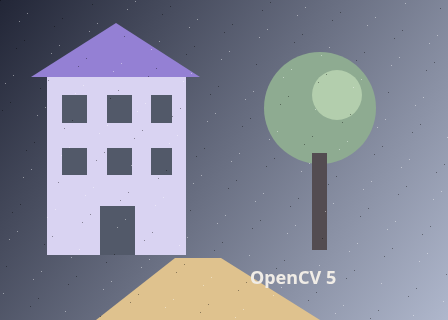
The unchanged source image. All steps use this same example.
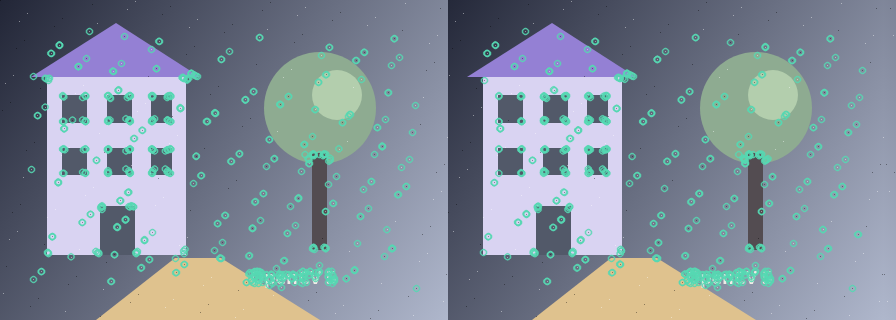
Circles mark detected features in each frame. Each feature also has a binary descriptor; correspondence has not been established yet.
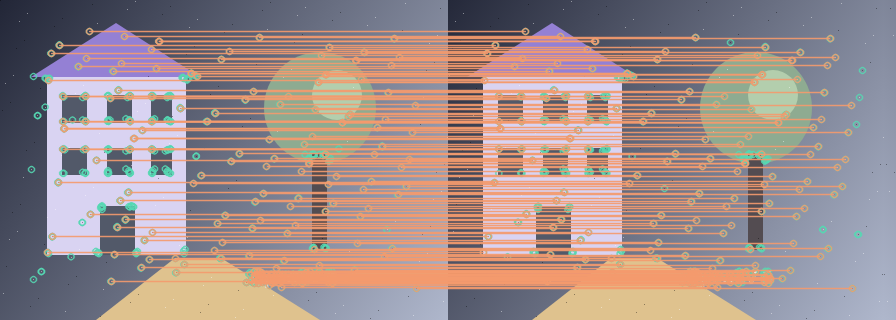
Cross-checked ORB descriptors before geometric rejection.
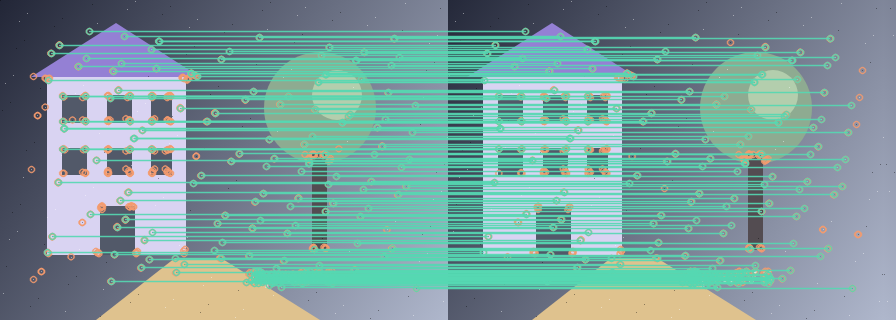
Only matches consistent with the fitted homography remain.
Extract ORB features
Explore the algorithm →ORB.createdetectAndComputeDetect and describe both images.
- Receives
- Two grayscale images.
- Passes to the next step
- Keypoint vectors and binary descriptor matrices.
Why this step? ORB produces repeatable keypoints and compact binary descriptions. Keeping coordinates beside each descriptor matters: descriptors support appearance matching, while coordinates support the later geometry check.
Match descriptors
Explore the algorithm →BFMatcherNORM_HAMMINGCross-check binary descriptors with Hamming distance.
- Receives
- Both descriptor matrices.
- Passes to the next step
- Candidate descriptor matches, each linking one first-image point to one second-image point.
Why this step? Mutual best matching reduces one-sided ambiguous matches. Sorting by Hamming distance and retaining up to 200 candidates gives the geometry fit a stronger starting set, but appearance alone can confuse repeated patterns.
Verify geometry
Explore the algorithm →findHomographyRANSACdrawMatchesDraw only correspondences accepted by RANSAC.
- Receives
- Candidate coordinate pairs.
- Produces
- A side-by-side image with lines connecting inlier keypoints, plus an inlier count.
Why this step? RANSAC searches for a homography supported by a subset of the pairs. Its inlier mask selects which links to draw, letting you distinguish appearance candidates from geometrically consistent evidence. Unlike the alignment recipe, this recipe stops at correspondence visualization.
Actual OpenCV 5.0.0 results on the illustrated sample, using the lab’s default algorithm settings. Masks, overlays and normalized fields are labelled previews; the data contracts above describe what the algorithms really exchange. Try this chain with your images ↓
Why this chain works
A descriptor match says two patches look alike. A verified match also agrees with a shared spatial transformation. Comparing candidate and verified links teaches which kind of evidence each stage contributes.
- 01
Extract ORB features
ORB.createdetectAndComputeORB produces repeatable keypoints and compact binary descriptions. Keeping coordinates beside each descriptor matters: descriptors support appearance matching, while coordinates support the later geometry check.
- Receives
- Two grayscale images.
- Passes on
- Keypoint vectors and binary descriptor matrices.
- 02
Match descriptors
BFMatcherNORM_HAMMINGMutual best matching reduces one-sided ambiguous matches. Sorting by Hamming distance and retaining up to 200 candidates gives the geometry fit a stronger starting set, but appearance alone can confuse repeated patterns.
- Receives
- Both descriptor matrices.
- Passes on
- Candidate descriptor matches, each linking one first-image point to one second-image point.
- 03
Verify geometry
findHomographyRANSACdrawMatchesRANSAC searches for a homography supported by a subset of the pairs. Its inlier mask selects which links to draw, letting you distinguish appearance candidates from geometrically consistent evidence. Unlike the alignment recipe, this recipe stops at correspondence visualization.
- Receives
- Candidate coordinate pairs.
- Passes on
- A side-by-side image with lines connecting inlier keypoints, plus an inlier count.
Tune and diagnose
Choose the parameters
Try a stricter RANSAC tolerance to see weak correspondences disappear, then inspect whether enough well-spread evidence remains. More features can help coverage but can also add repeated or low-quality candidates.
Read the result
Useful inliers span the overlapping scene and follow one coherent mapping. Many nearly coincident points or repeated motifs can support a misleading model. A high inlier count alone does not establish that the images were aligned correctly.
Try it with your images
Choose an input image and a second image. Without uploads, the lab uses a labelled synthetic pair. Run the recipe, then use the stage buttons to inspect intermediate results without rerunning it.
Experiment at pixel level
See which ORB descriptor matches agree with one estimated projective transform.
The engine loads on your first run. Your images stay in this browser.
Scroll over either image to zoom at the pointer. Use the scrollbars to pan both views over the same relative area. Zoom is relative to the input; pixel coordinates belong to each image. Warps can change scene correspondence.
Pixel inspector RGBA · native values · matched scale · 9 × 9 output pixels
Select a pixel
Select a pixel
Assumptions and limits
Geometric consistency is stronger than descriptor similarity, but repeated patterns can still produce a wrong transform.
TypeScript core chain
Initialize the shared engine once with await initOpenCV(), then use these named imports. In a bundled browser app, pass the WASM URL as shown in the quickstart. image is an 8-bit BGR Mat from that same engine; paired recipes receive an equally sized nextImage. Region recipes use an in-bounds pixel rect. Read outputs before the using scope ends. See matrix ownership.
import {
  BFMatcher,
  DMatchVector,
  KeyPointVector,
  Mat,
  NORM_HAMMING,
  ORB_create,
  drawMatches
} from '@banou/opencv-wasm'

// The engine is already initialized; image is an 8-bit BGR Mat.
// nextImage is the equally sized second frame from the same engine.
// "using" releases native handles at scope exit; inspect or copy outputs before then.

// 1. ORB detects up to 800 oriented features and binary descriptors.
// Hamming distance compares descriptor bits; true enables mutual-best cross-checking.
using orb = ORB_create(800), matcher = new BFMatcher(NORM_HAMMING, true)
// Factories can return null, so check before using the detector.
if (!orb) throw new Error('ORB factory failed')
// Store each image's feature coordinates separately from its descriptor rows.
using first = new KeyPointVector(), second = new KeyPointVector()
// a/b will hold descriptors; an empty mask allows features anywhere in the image.
using a = new Mat(), b = new Mat(), mask = new Mat()
// Detect keypoints in the first image and write their descriptors into a.
orb.detectAndCompute(image, mask, first, a)
// Do the same for the second image; descriptor row i belongs to keypoint i.
orb.detectAndCompute(nextImage, mask, second, b)
// 2. Allocate match records and the combined visualization image.
using matches = new DMatchVector(), output = new Mat()
// Find mutual-best matches only when both descriptor sets contain features.
if (!a.empty() && !b.empty()) matcher.match(a, b, matches)
// 3. Place the images side by side and connect the proposed keypoint pairs.
// These lines show descriptor similarity, not yet verified geometric agreement.
drawMatches(image, first, nextImage, second, matches, output)
// This is the candidate view. RANSAC in the full recipe rejects inconsistent matches.
The snippets isolate the core operations. The complete runnable recipes also include validation, filtering, overlays, intermediate previews and resource cleanup.