Crop the largest foreground object
Threshold and clean a mask, find the largest external contour, then crop its bounding box with padding.
The pipeline
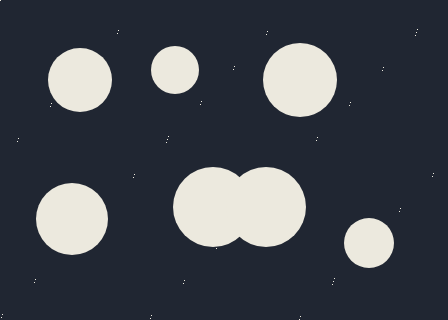
The unchanged source image. All steps use this same example.
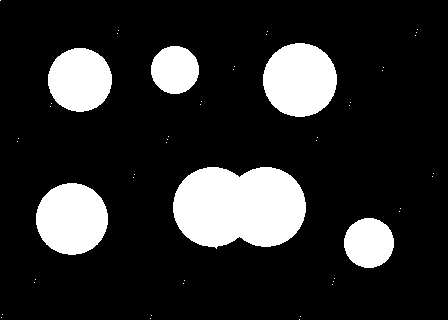
Foreground pixels used for external contour extraction.
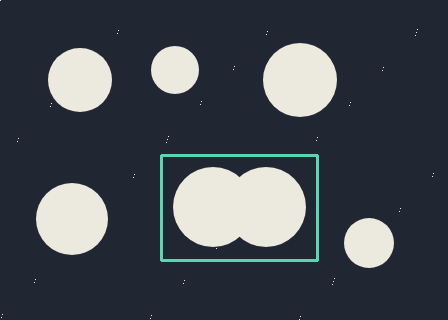
Bounding rectangle of the largest external contour plus padding.
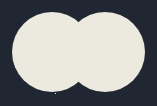
Crop (161, 155), 157 × 106; contour area 8741.5 px².
Build a clean mask
Explore the algorithm →thresholdmorphologyExMORPH_CLOSEThreshold and close small gaps.
- Receives
- Grayscale intensity.
- Passes to the next step
- A cleaned foreground mask.
Why this step? Thresholding identifies bright foreground and closing fills small breaks. Repairing the mask before finding contours reduces the chance that one intended object is split into multiple smaller candidates.
Find the largest object
Explore the algorithm →findContourscontourAreaCompare external contour areas.
- Receives
- The cleaned mask.
- Passes to the next step
- The contour with the largest enclosed area.
Why this step? External contours describe each candidate silhouette. Comparing contour areas chooses the largest foreground object, which is a useful heuristic when one subject dominates the frame but is not a semantic subject detector.
Crop its bounding rectangle
Explore the algorithm →boundingRectMat.roiMat.copyToAdd a configurable margin while staying inside the image.
- Receives
- The selected contour and original colour image.
- Produces
- A smaller colour image with the selected bounds and crop dimensions reported.
Why this step? An axis-aligned bounding box includes the complete contour. Padding adds context, clipping keeps the rectangle inside the image, and copying the ROI creates an independently owned crop. No resizing is needed.
Actual OpenCV 5.0.0 results on the illustrated sample, using the lab’s default algorithm settings. Masks, overlays and normalized fields are labelled previews; the data contracts above describe what the algorithms really exchange. Try this chain with your images ↓
Why this chain works
Automatic cropping combines a foreground decision with a simple selection rule: keep the largest silhouette. Its bounding rectangle determines which original pixels to retain.
- 01
Build a clean mask
thresholdmorphologyExMORPH_CLOSEThresholding identifies bright foreground and closing fills small breaks. Repairing the mask before finding contours reduces the chance that one intended object is split into multiple smaller candidates.
- Receives
- Grayscale intensity.
- Passes on
- A cleaned foreground mask.
- 02
Find the largest object
findContourscontourAreaExternal contours describe each candidate silhouette. Comparing contour areas chooses the largest foreground object, which is a useful heuristic when one subject dominates the frame but is not a semantic subject detector.
- Receives
- The cleaned mask.
- Passes on
- The contour with the largest enclosed area.
- 03
Crop its bounding rectangle
boundingRectMat.roiMat.copyToAn axis-aligned bounding box includes the complete contour. Padding adds context, clipping keeps the rectangle inside the image, and copying the ROI creates an independently owned crop. No resizing is needed.
- Receives
- The selected contour and original colour image.
- Passes on
- A smaller colour image with the selected bounds and crop dimensions reported.
Tune and diagnose
Choose the parameters
Fix the foreground threshold before adjusting crop padding. Larger closing kernels can merge unrelated bright areas and change which object wins. Padding is measured in processed-image pixels.
Read the result
Selected bounds should surround the intended subject. A bright wall or frame may be larger than that subject. Cropping retains background inside the rectangle; use the cutout recipe when you need transparency.
Try it with your images
Choose your own image or start with the built-in sample. Run the recipe, then use the stage buttons to inspect intermediate results without rerunning it.
Experiment at pixel level
Threshold and clean a mask, find the largest external contour, then crop its bounding box with padding.
The engine loads on your first run. Your images stay in this browser.
Scroll over either image to zoom at the pointer. Use the scrollbars to pan both views over the same relative area. Zoom is relative to the input; pixel coordinates belong to each image. Warps can change scene correspondence.
Pixel inspector RGBA · native values · matched scale · 9 × 9 output pixels
Select a pixel
Select a pixel
Assumptions and limits
The largest bright component is not always the subject. This produces a rectangular crop, not a cutout.
TypeScript core chain
Initialize the shared engine once with await initOpenCV(), then use these named imports. In a bundled browser app, pass the WASM URL as shown in the quickstart. image is an 8-bit BGR Mat from that same engine; paired recipes receive an equally sized nextImage. Region recipes use an in-bounds pixel rect. Read outputs before the using scope ends. See matrix ownership.
import {
  CHAIN_APPROX_SIMPLE,
  COLOR_BGR2GRAY,
  Mat,
  MatVector,
  RETR_EXTERNAL,
  THRESH_BINARY,
  boundingRect,
  contourArea,
  cvtColor,
  findContours,
  threshold
} from '@banou/opencv-wasm'

// The engine is already initialized; image is an 8-bit BGR Mat.
// rect is an in-bounds { x, y, width, height } rectangle in processed pixels.
// "using" releases native handles at scope exit; inspect or copy outputs before then.

// 1. Allocate grayscale, a silhouette mask and hierarchy metadata for contours.
using gray = new Mat(), mask = new Mat(), hierarchy = new Mat()
// Keep contour coordinates in a vector and reserve an independent output Mat.
using contours = new MatVector(), output = new Mat()
// Convert colour to brightness for the simple bright-foreground selection.
cvtColor(image, gray, COLOR_BGR2GRAY)
// Mark values greater than 127 as white foreground.
threshold(gray, mask, 127, 255, THRESH_BINARY)
// 2. Extract external outlines; straight boundary runs are compressed.
// The full lab also closes small gaps in the mask before this extraction.
findContours(mask, contours, hierarchy, RETR_EXTERNAL, CHAIN_APPROX_SIMPLE)
// Remember the largest enclosed area and its axis-aligned bounds.
// The initial rect is only a placeholder; a successful search replaces it.
let largest = 0, bounds = rect
// Consider each candidate foreground outline.
for (let i = 0; i < contours.size(); i++) {
  // Release each vector-returned contour handle when this iteration ends.
  using contour = contours.get(i)!
  // Measure enclosed contour area to choose the largest foreground candidate.
  const area = contourArea(contour)
  // When a larger object wins, keep its bounding rectangle as the crop region.
  if (area > largest) { largest = area; bounds = boundingRect(contour) }
}
// Do not silently return an unrelated crop when thresholding found no object.
if (!largest) throw new Error('No foreground found')
// 3. An ROI selects existing pixels without resizing and shares the source storage.
using crop = image.roi(bounds)
// Copy into independent storage so the output remains valid after the source is released.
// The full lab adds configurable padding and clips those bounds to the image.
crop.copyTo(output)
The snippets isolate the core operations. The complete runnable recipes also include validation, filtering, overlays, intermediate previews and resource cleanup.