Align two overlapping images
Match ORB features, reject inconsistent correspondences with RANSAC, then warp the second image into the first image’s coordinates.
The pipeline
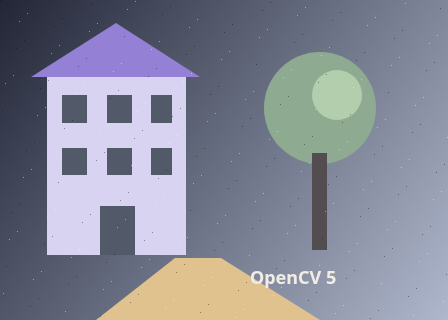
The unchanged source image. All steps use this same example.
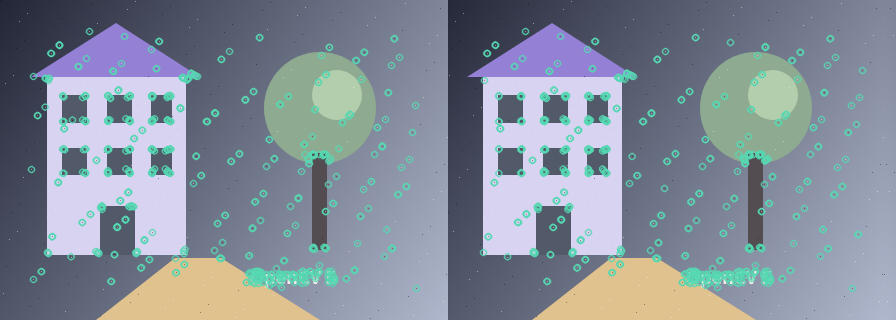
Circles mark detected features in each frame. Each feature also has a binary descriptor; correspondence has not been established yet.
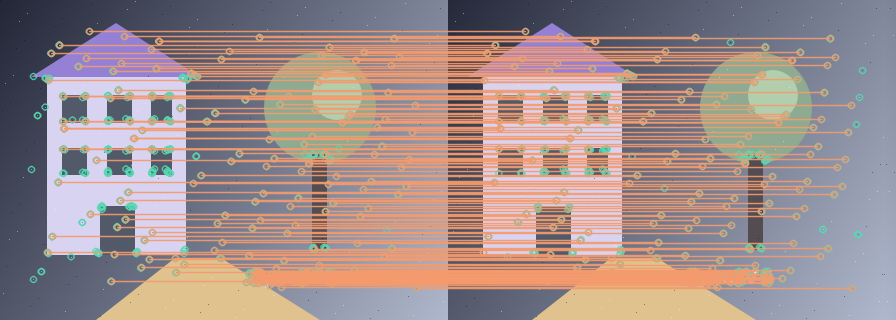
Cross-checked ORB descriptors before geometric rejection.
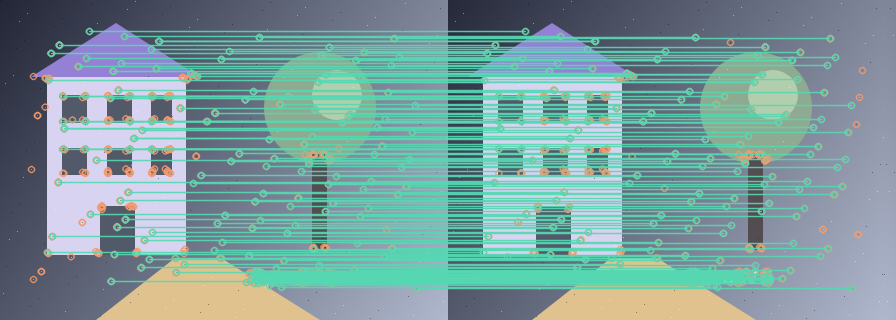
Only matches consistent with the fitted homography remain.
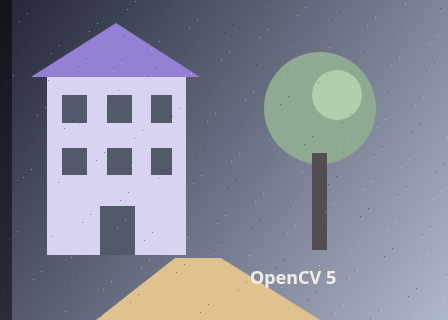
Equal blend of the reference and aligned frame. Double edges reveal disagreement.
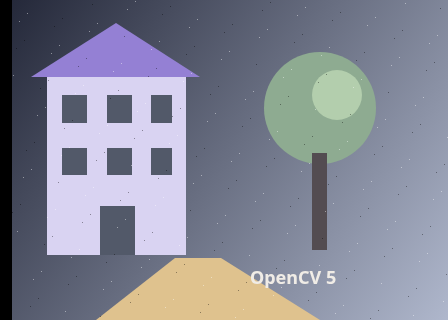
200 RANSAC inliers from 200 candidate matches. Output is the second image warped to the first image’s coordinates.
Describe both images
Explore the algorithm →ORB.createdetectAndComputeORB produces oriented keypoints and binary descriptors.
- Receives
- Two overlapping grayscale views.
- Passes to the next step
- Keypoint coordinates and a descriptor matrix for each image. Descriptor rows correspond to keypoints.
Why this step? ORB finds multiscale, oriented keypoints and describes each neighbourhood as a binary pattern. This gives matching evidence even when a plain pixel comparison fails because the images are translated, rotated or moderately rescaled.
Keep consistent matches
Explore the algorithm →BFMatcherNORM_HAMMINGfindHomographyHamming matches feed a RANSAC homography.
- Receives
- Binary descriptor pairs, then their matched 2D coordinates.
- Passes to the next step
- A first-to-second 3×3 homography and an inlier mask.
Why this step? Hamming distance counts differing descriptor bits. Cross-checking keeps mutual best matches; the lab retains up to 200 lowest-distance candidates. Similar-looking patches can still be wrong, so RANSAC keeps matches consistent with a single projective transform rather than trusting descriptor distance alone.
Warp to the reference
Explore the algorithm →warpPerspectiveWARP_INVERSE_MAPaddWeightedApply the inverse mapping so the second image lines up with the first.
- Receives
- The second colour frame and the fitted first-to-second homography.
- Produces
- The second image resampled onto the first image grid, ready for comparison or compositing.
Why this step? The output should use first-frame coordinates. WARP_INVERSE_MAP lets the warp use the fitted first-to-second map to look up source pixels in the second frame for each output position. An equal-weight overlay makes residual misalignment visible as doubled edges.
Actual OpenCV 5.0.0 results on the illustrated sample, using the lab’s default algorithm settings. Masks, overlays and normalized fields are labelled previews; the data contracts above describe what the algorithms really exchange. Try this chain with your images ↓
Why this chain works
Alignment needs corresponding locations before it can decide how to warp pixels. Descriptors propose those locations; a geometric model tests whether they can belong to the same view change.
- 01
Describe both images
ORB.createdetectAndComputeORB finds multiscale, oriented keypoints and describes each neighbourhood as a binary pattern. This gives matching evidence even when a plain pixel comparison fails because the images are translated, rotated or moderately rescaled.
- Receives
- Two overlapping grayscale views.
- Passes on
- Keypoint coordinates and a descriptor matrix for each image. Descriptor rows correspond to keypoints.
- 02
Keep consistent matches
BFMatcherNORM_HAMMINGfindHomographyHamming distance counts differing descriptor bits. Cross-checking keeps mutual best matches; the lab retains up to 200 lowest-distance candidates. Similar-looking patches can still be wrong, so RANSAC keeps matches consistent with a single projective transform rather than trusting descriptor distance alone.
- Receives
- Binary descriptor pairs, then their matched 2D coordinates.
- Passes on
- A first-to-second 3×3 homography and an inlier mask.
- 03
Warp to the reference
warpPerspectiveWARP_INVERSE_MAPaddWeightedThe output should use first-frame coordinates. WARP_INVERSE_MAP lets the warp use the fitted first-to-second map to look up source pixels in the second frame for each output position. An equal-weight overlay makes residual misalignment visible as doubled edges.
- Receives
- The second colour frame and the fitted first-to-second homography.
- Passes on
- The second image resampled onto the first image grid, ready for comparison or compositing.
Tune and diagnose
Choose the parameters
Increase ORB features when overlap is small or features are unevenly distributed. RANSAC tolerance is a reprojection distance in processed pixels: too tight rejects useful noisy matches; too loose accepts the wrong geometry.
Read the result
Look at both the inlier distribution and Alignment overlay. A correct fit should align structures across the shared plane, not just in one corner. A planar scene or camera rotation can fit a homography; depth-dependent parallax and independently moving objects often cannot.
Try it with your images
Choose an input image and a second image. Without uploads, the lab uses a labelled synthetic pair. Run the recipe, then use the stage buttons to inspect intermediate results without rerunning it.
Experiment at pixel level
Match ORB features, reject inconsistent correspondences with RANSAC, then warp the second image into the first image’s coordinates.
The engine loads on your first run. Your images stay in this browser.
Scroll over either image to zoom at the pointer. Use the scrollbars to pan both views over the same relative area. Zoom is relative to the input; pixel coordinates belong to each image. Warps can change scene correspondence.
Pixel inspector RGBA · native values · matched scale · 9 × 9 output pixels
Select a pixel
Select a pixel
Assumptions and limits
A homography assumes a planar scene or mostly rotational camera motion. Parallax and moving objects can stay misaligned.
TypeScript core chain
Initialize the shared engine once with await initOpenCV(), then use these named imports. In a bundled browser app, pass the WASM URL as shown in the quickstart. image is an 8-bit BGR Mat from that same engine; paired recipes receive an equally sized nextImage. Region recipes use an in-bounds pixel rect. Read outputs before the using scope ends. See matrix ownership.
import {
  BFMatcher,
  CV_32FC2,
  DMatchVector,
  INTER_LINEAR,
  KeyPointVector,
  Mat,
  NORM_HAMMING,
  ORB_create,
  RANSAC,
  WARP_INVERSE_MAP,
  countNonZero,
  findHomography,
  warpPerspective
} from '@banou/opencv-wasm'

// The engine is already initialized; image is an 8-bit BGR Mat.
// nextImage is the equally sized second frame from the same engine.
// "using" releases native handles at scope exit; inspect or copy outputs before then.

// 1. ORB detects up to 800 oriented features and binary descriptors.
// Hamming distance compares descriptor bits; true enables mutual-best cross-checking.
using orb = ORB_create(800), matcher = new BFMatcher(NORM_HAMMING, true)
// Factories can return null, so check before using the detector.
if (!orb) throw new Error('ORB factory failed')
// Store each image's feature coordinates separately from its descriptor rows.
using first = new KeyPointVector(), second = new KeyPointVector()
// a/b will hold descriptors; an empty mask allows features anywhere in the image.
using a = new Mat(), b = new Mat(), mask = new Mat()
// Detect keypoints in the first image and write their descriptors into a.
orb.detectAndCompute(image, mask, first, a)
// Do the same for the second image; descriptor row i belongs to keypoint i.
orb.detectAndCompute(nextImage, mask, second, b)
// Matching requires at least some detectable features in both views.
if (a.empty() || b.empty()) throw new Error('Both images need features')
// 2. Allocate a native vector of descriptor-match records.
using matches = new DMatchVector()
// Match descriptors by Hamming distance with the cross-check selected above.
matcher.match(a, b, matches)
// Copy the match records into JavaScript, rank by distance (smaller is better),
// and retain the best 200 candidates for the geometric fit.
const ordered = Array.from({ length: matches.size() }, (_, i) => matches.get(i)!)
  .sort((a, b) => a.distance - b.distance).slice(0, 200)
// A homography needs at least four point correspondences; geometry must also be suitable.
if (ordered.length < 4) throw new Error('Fewer than four matches')
// queryIdx indexes first-image keypoints; pack their x,y coordinates.
const from = ordered.flatMap(m => { const p = first.get(m.queryIdx)!.pt; return [p.x, p.y] })
// trainIdx indexes second-image keypoints; preserve the same match order.
const to = ordered.flatMap(m => { const p = second.get(m.trainIdx)!.pt; return [p.x, p.y] })
// Pack the coordinate lists as N rows of two-channel float32 points.
// inliers will mark the correspondences consistent with one transform.
using sourcePoints = new Mat(ordered.length, 1, CV_32FC2)
using targetPoints = new Mat(ordered.length, 1, CV_32FC2), inliers = new Mat()
// Copy the first-image coordinates into the source-point matrix.
sourcePoints.data32F.set(from)
// Copy the corresponding second-image coordinates into the target matrix.
targetPoints.data32F.set(to)
// 3. RANSAC fits a first-to-second projective map while rejecting outliers.
// The 3-pixel threshold controls acceptable reprojection error in processed pixels.
using homography = findHomography(sourcePoints, targetPoints, RANSAC, 3, inliers)
// Reject failed fits and fits supported by fewer than four inlier pairs.
if (homography.empty() || countNonZero(inliers) < 4) throw new Error('No stable homography')
// Allocate the destination for the aligned second image.
using output = new Mat()
// For each first-frame output position, look up the corresponding second-frame
// source position with the fitted map. WARP_INVERSE_MAP selects that lookup direction;
// INTER_LINEAR interpolates fractional positions. Output uses the first frame's size.
warpPerspective(nextImage, output, homography, { width: image.cols, height: image.rows },
  INTER_LINEAR | WARP_INVERSE_MAP)
The snippets isolate the core operations. The complete runnable recipes also include validation, filtering, overlays, intermediate previews and resource cleanup.